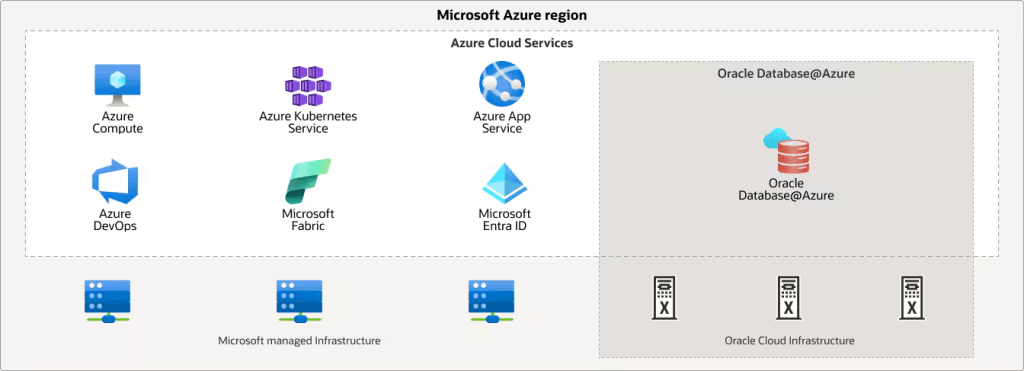
As I have been studying for the Oracle Cloud Infrastructure 2025 Multicloud Architect Professional exam (1Z0-1151-25), this question caused me to pause and test a few things! Both Oracle Database Service for Azure and Oracle Database@Azure allows you to use Oracle databases within the Azure ecosystem.
Still, they differ in how they achieve this:
Oracle Database Service for Azure

- Location: Your Oracle databases reside in Oracle Cloud Infrastructure (OCI), not in Azure data centers.
- Connection: Leverages OCI Azure Interconnect to establish a private connection between your Azure environment and OCI. It is a dedicated, high-speed network pipe between the two clouds.
- Management: You manage your databases through the Oracle Database Service for Azure portal, which has a look and feel similar to that of the Azure portal. Thanks to automatic identity federation, you also get access to the OCI Console with your Azure credentials.
- Benefits:
- Familiar Oracle environment: If you’re already comfortable with OCI, this option provides a smoother transition.
- Tight integration: Offers streamlined integration with other OCI services.
- Simplified networking: Automates the complex network configuration between Azure and OCI.
Oracle Database@Azure

- Location: Oracle database infrastructure and databases are physically located within Azure data centers.
- Connection: Since everything resides within Azure, you have the lowest possible latency between your databases and other Azure services.
- Management: You manage your databases using familiar Azure tools and services.
- Benefits:
- Optimal performance: Co-location minimizes latency for applications running in Azure.
- Native Azure experience: Integrates seamlessly with other Azure services and management tools.
- Streamlined migration: Migrating existing Oracle databases to Azure without significant changes is easier.
In essence:
- Oracle Database Service for Azure is like extending your Azure environment to include OCI, giving you access to Oracle databases within a familiar Oracle environment.
- Oracle Database@Azure brings the Oracle database experience directly into Azure, offering optimal performance and integration with Azure services.
The best choice depends on your specific needs and priorities. Consider factors like:
- Performance requirements: Oracle Database@Azure might be preferable if low latency is critical.
- Existing infrastructure: If you heavily rely on OCI, Oracle Database Service for Azure could be a better fit.
- Management preferences: Choose the service that aligns with your preferred management tools and workflows.
I hope this clarifies the differences! Let me know if you have any other questions.
 Alex Lima
Leave a comment