Introduction
Oracle GoldenGate is widely used for real-time data replication, but managing its network configurations across multiple deployments can be a little tricker for finding out.
When troubleshooting, performing security audits, or setting up integrations, quickly retrieving the network listening ports of GoldenGate services can be a lifesaver.
To simplify this, I’ve created an ad-hoc query script that automates the retrieval of:
- The Service Manager’s listening port
- Each deployment’s GoldenGate services & their ports
No more manual API calls or checking logs—this script fetches and formats everything into a clear, structured table.
Why Do You Need This Script?
Oracle GoldenGate deployments include multiple services, each running on a dedicated port:
- ServiceManager – The main service that manages deployments
- adminsrvr – Administration Server
- distsrvr – Distribution Server
- pmsrvr – Performance Metrics Server
- recvsrvr – Receiver Server
Without automation, checking these services means running multiple API queries manually—time-consuming and error-prone.
This script eliminates that hassle by automatically:
- Querying the GoldenGate REST API
- Extracting service ports for multiple deployments
- Formatting results into a readable table
- Handling errors gracefully (missing ports, service downtime, etc.)
How the Script Works
Retrieves Service Manager Port
- The script first queries the Service Manager API to find its network listening port:
/services/v2/deployments/ServiceManager/services/ServiceManagerFetches Deployment Service Ports
- For each deployment (e.g., WEST, EAST, etc.), the script retrieves the ports for:
/services/v2/deployments/{deployment_name}/services/{service_name}Outputs Data in a Structured Table
Instead of raw JSON, the script formats result in a clean, readable table.
Example Output
When executed, the script returns:
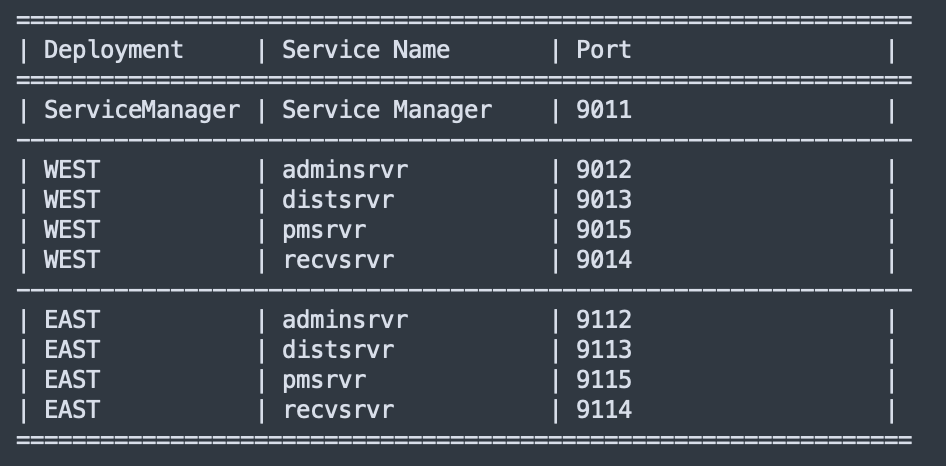
- Service Manager Port (ServiceManager) – Ensures easy access to deployment management
- Deployment Services (WEST, EAST) – Confirms correct configurations
- Structured Formatting – Helps quickly analyze the data
Key Benefits of Using This Script
1. Eliminates Manual Lookups
- Instead of checking each service manually, this script does it in one step.
2. Helps Troubleshoot Configuration Issues
- Easily verify if a service is missing or listening on the wrong port.
3. Useful for Firewall & Security Checks
- Quickly confirm if firewall rules allow communication between services.
4. Supports Multiple Deployments Automatically
- The script dynamically fetches ports for multiple deployments (e.g., WEST, EAST, etc.).
5. Clear & Readable Output
- Ports are displayed in an organized table
- Errors (e.g., missing services) are clearly indicated
The Script
#!/bin/bash

# ----------------------------------------------------------
# Script Name: ogg_check_services_ports.sh
# Author: Alex Lima
# Description:
#   This script queries an GoldenGate API for all GoldenGate deployment services
#   and extracts their network listening ports.
#
# Features:
#   - Loops through a list of service names.
#   - Sends API requests to retrieve service details.
#   - Extracts the "serviceListeningPort" value from the JSON response.
#   - Handles errors gracefully if the API is unreachable or if data is missing.
#   - Uses configurable variables for host, port, authentication, and deployments.
#
# Requirements:
#   - `curl` must be installed to make API requests.
#   - `jq` must be installed to parse JSON responses.
#
# Usage:
#   1. Modify the script variables (e.g., host, port, deployment and authentication).
#   2. Give execution permissions: chmod +x ogg_check_services_ports.sh
#   3. Run the script: ./ogg_check_services_ports.sh
#
# ----------------------------------------------------------

# Define variables
host_name="localhost"      # OGG host
port="9090"                       # OGG port (Service Manager might have a different port)
deployments=("WEST" "EAST") # List of deployments to query, e.g multiple deployments ("WEST" "EAST")
service_names=("adminsrvr" "distsrvr" "pmsrvr" "recvsrvr") # List of services - DO NOT CHANGE THIS

# Authentication
auth_token="Basic b2dnYWRtaW46V2VsY29tZSMjMTIz"

# API paths
api_path="/services/v2/deployments"
service_manager_path="/services/v2/deployments/ServiceManager/services/ServiceManager"

# JSON path to extract serviceListeningPort
json_service_port=".response.config.network.serviceListeningPort"

# Print table header
echo "==================================================="
echo "| Deployment     | Service Name       | Port      |"
echo "==================================================="

# Query the Service Manager for its port
service_manager_url="https://${host_name}:${port}${service_manager_path}"
service_manager_response=$(curl --location --silent --fail --insecure \
  "$service_manager_url" \
  --header "Authorization: $auth_token")

# Extract Service Manager port
service_manager_port=$(echo "$service_manager_response" | jq -r "$json_service_port" 2>/dev/null)

# Display Service Manager Port
if [[ -z "$service_manager_port" || "$service_manager_port" == "null" ]]; then
  service_manager_port="Not Available"
fi
printf "| %-14s | %-18s | %-9s |\n" "ServiceManager" "Service Manager" "$service_manager_port"
echo "---------------------------------------------------"

# Loop through each deployment
for deployment_name in "${deployments[@]}"; do

  # Loop through each service in the deployment
  for service_name in "${service_names[@]}"; do

    # Construct API URL
    api_url="https://${host_name}:${port}${api_path}/${deployment_name}/services/${service_name}"

    # Send API request with --insecure
    response=$(curl --location --silent --fail --insecure \
      "$api_url" \
      --header "Authorization: $auth_token")

    # Check if request failed
    if [[ $? -ne 0 ]]; then
      printf "| %-14s | %-18s | %-9s |\n" "$deployment_name" "$service_name" "Error"
      continue
    fi

    # Extract the serviceListeningPort
    service_port=$(echo "$response" | jq -r "$json_service_port" 2>/dev/null)

    # Check if port is found
    if [[ -z "$service_port" || "$service_port" == "null" ]]; then
      service_port="Not Available"
    fi

    # Print row
    printf "| %-14s | %-18s | %-9s |\n" "$deployment_name" "$service_name" "$service_port"

  done
  echo "---------------------------------------------------"
done
Limitations & Future Enhancements
Not a Continuous Monitor
- This is an on-demand tool, not a real-time monitoring solution
- If you need alerts, consider integrating it with Prometheus or Grafana
No Auto-Alerts
- If a service is missing, it just prints “Not Available”
- You could extend it to send email or Slack notifications
SSL Validation Bypassed (–insecure)
- The script currently ignores SSL errors
- In production, consider using a proper certificate (–cacert)
Conclusion
This script is a quick and efficient way to retrieve Oracle GoldenGate service ports without the hassle of manual lookups. Whether you’re a database administrator, DevOps engineer, or security analyst, this tool will save time and provide instant insights into GoldenGate deployments. You need to get into the GoldenGate APIs to become an expert.
Try it out and make your GoldenGate management more efficient!
 Alex Lima
Leave a comment