Why Logdump Matters
Every Oracle GoldenGate deployment depends on trail files, the immutable record of changes moving between systems. While most admins focus on Extract and Replicat parameters, the real detective work often happens in Logdump, a command-line powerhouse purpose-built for inspecting, filtering, and validating trail files.
For GoldenGate administrators, mastering Logdump isn’t optional, it’s a critical skill. It allows you to:
- Validate replication health at the lowest level.
- Troubleshoot complex lag, data loss, or transaction ordering issues.
- Prove encryption compliance and security standards.
- Gain credibility with support teams and database engineers.
Put simply: the best GoldenGate admins are those who can open a trail file and instantly tell what’s really happening inside.
Getting Started with Logdump
Logdump comes with every GoldenGate installation. Launch it from $OGG_HOME:
$ cd $OGG_HOME
$ ./logdump
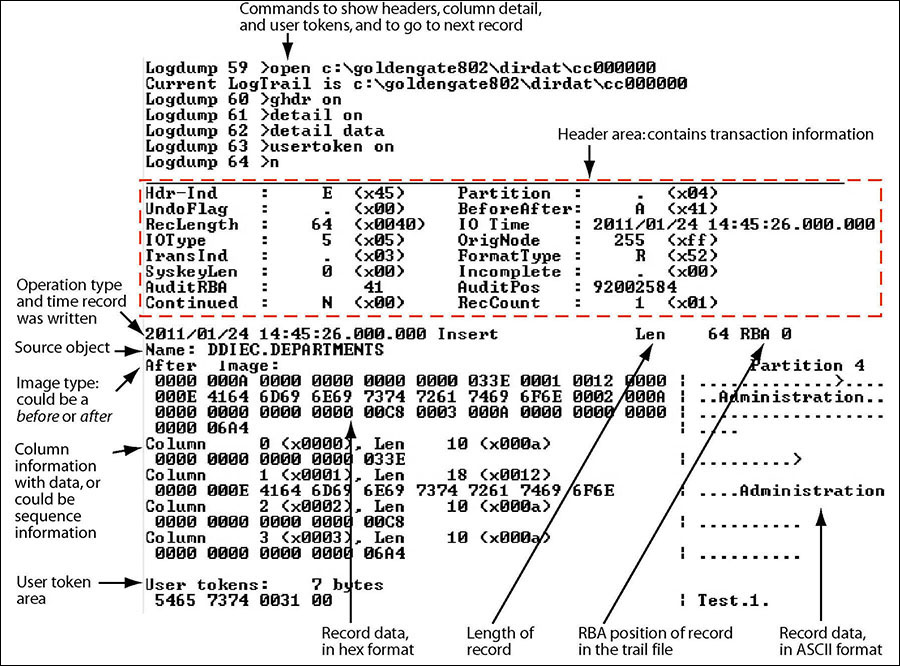
Immediately you’ll notice each command is numbered, allowing you to recall, edit, or repeat commands via HISTORY and FC (fix command). Command history is also persisted to logdump.hst for reuse across sessions .
Core Viewing Setup
Oracle recommends enabling a few baseline options to see everything you need :
Logdump 1> GHDR ON       -- show record headers
Logdump 2> DETAIL ON     -- show column metadata
Logdump 3> DETAIL DATA   -- add hex + ASCII values
Logdump 4> USERTOKEN ON  -- display custom user tokens
Logdump 5> GGSTOKEN ON   -- display built-in tokens (XID, rowid, etc.)
Then, open a trail file:
Logdump 6> OPEN dirdat/lt000001
Logdump 7> N
Now you’re reading trail records in sequence.
Practical Use Case
1. Navigating Transactions
- Find headers:
SCANFORHEADER(orSFH) - Transaction boundaries:
GHDR ON; DETAIL ON; Nand check theTransIndflag (x00 = start, x02 = end, x03 = single record) . - End of transaction:
SCANFORENDTRANS(orSFET).
This is critical when troubleshooting open or long-running transactions.
2. Counting Records
Logdump 67> COUNT DETAIL
Provides:
- Record counts per table
- Average record size
- Breakdown of Inserts, Updates, Deletes
For trend analysis, add:
Logdump 68> COUNT INTERVAL 5
to report activity in 5-minute windows.
3. Filtering Data
You can surgically zoom into specific tables or record types:
Logdump 60> FILTER INCLUDE FILENAME hr.employees
Logdump 61> FILTER RECTYPE insert
Logdump 62> FILTER MATCH ALL
When done:
Logdump 63> FILTER CLEAR
This is especially powerful for isolating PII-sensitive tables or troublesome workloads.
4. Working with Encrypted Trails
Modern deployments often enforce AES or OCI KMS–based trail encryption. Enable decryption with the key name used during ENCRYPTTRAIL:
export OGG_VAR_HOME=/app/Deployment/var
export OGG_ETC_HOME=/app/Deployment/etc
export OGG_SSL_HOME=/app/ServiceManager/etc/ssl
Logdump 47> OPEN /app/Deployment/var/lib/data/tt000001
Logdump 48> DECRYPT ON KEYNAME my_aes_key
Logdump tries to load the AES key from the local GoldenGate wallet/key store. If the key is correct, you’ll see confirmation messages printed right in the Logdump session. They look something like this:
Using encryption key: my_aes_key

2025-09-10 14:22:45 INFO  OGG-25207 Loading master encryption key from Oracle Wallet.
2025-09-10 14:22:45 INFO  OGG-25851 Using encryption key 'my_aes_key'.
Then proceed as normal (DETAIL DATA; N) to view decrypted rows .
5. Viewing Before and After Images
One of the most powerful features in Logdump is the ability to see how a row looked before and after an update. This is invaluable when troubleshooting replication issues, verifying change capture, or performing data forensics.
Commands to Enable Before/After View
Logdump> GHDR ON
Logdump> DETAIL ON
Logdump> DETAIL DATA
Logdump> NEXT
GHDR ON– shows the record headers (transaction info, record type, etc.).DETAIL ON– shows column metadata (name, index, length).DETAIL DATA– adds hex and ASCII values for each column.NEXT(orN) – advances to the next record in the trail.
When you land on an UPDATE record, Logdump will automatically display both the Before Image and the After Image for each column.
Example Output
2025/09/10 19:15:42.000.000 Update        Len   128  RBA 6021
Name: HR.EMPLOYEES   (TDR Index: 2)   Partition x0a

Before  Image:
  Column 0 (0x0000), Length 8 (0x0008).
    0000 3130 3031                                | 1001
  Column 1 (0x0001), Length 20 (0x0014).
    0000 4a6f 686e                                | John
  Column 2 (0x0002), Length 20 (0x0014).
    0000 446f 65                                  | Doe
  Column 3 (0x0003), Length 10 (0x000a).
    0000 4954                                     | IT

After  Image:
  Column 0 (0x0000), Length 8 (0x0008).
    0000 3130 3031                                | 1001
  Column 1 (0x0001), Length 20 (0x0014).
    0000 4a6f 686e                                | John
  Column 2 (0x0002), Length 20 (0x0014).
    0000 446f 65                                  | Doe
  Column 3 (0x0003), Length 10 (0x000a).
    0000 4669 6e61 6e63 65                        | Finance
Why This Matters
- Confirms that update operations are captured correctly.
- Allows you to audit sensitive changes in the replication stream.
- Essential when diagnosing conflicts in Active-Active or parallel replication environments.
6. Session Logging
Capture everything for audits or replay:
Logdump 70> LOG TO session.txt
Logdump 71> WRITELOG "Investigating SCN gap issue"
...
Logdump 72> LOG STOP
7. Evaluating Transaction Size
With TRANSHIST, you can rank the biggest offenders in trail data:
Logdump 80> TRANSHIST 200
Logdump 81> TRANSBYTELIMIT 100000
Logdump 82> COUNT
This reveals oversized transactions that might bottleneck your Replicat apply, giving you candidates for table remapping or batching .
Advanced Tricks
- FILEHEADER: Inspect the trail header for version, OS, database vendor, encryption metadata.
- OBEY: Automate repeatable sessions with a
.obyscript of Logdump commands. - DECRYPT ON KEYNAME my_aes_key: Handle AES-encrypted trails with wallet keys.
- ENV: Quick dump of current settings, including endianess, trail position, and active filters.
Best Practices
- Always run Logdump in read-only mode (never alter trails).
- Filter early, large trails can overwhelm without constraints.
- Use
SAVEto export filtered subsets for reproducible support tickets. - Combine with
COUNTandTRANSHISTfor workload analysis before scaling Replicats. - Document findings with
LOGso others can replay your investigative session.
Why This Skill Elevates GoldenGate Admins
GoldenGate environments are often mission-critical, financial transactions, healthcare records, global retail systems. When something breaks, executives expect answers fast.
Admins who know Logdump can:
- Go beyond surface metrics and pinpoint root causes.
- Handle Oracle Support cases more effectively by sharing precise filtered trail excerpts.
- Build trust with application teams by explaining replication events at the row and column level.
- Anticipate scaling problems by spotting oversized transactions before they hit Replicat bottlenecks.
In other words, Logdump mastery separates the operators from the architects.
Closing Thoughts
Oracle GoldenGate’s Logdump may look old-school, but it’s an indispensable forensics tool for trail files. For administrators, it’s also a career skill, the difference between reacting to incidents and leading replication strategy with confidence.
Next time your replication lags, a transaction hangs, or encryption looks opaque, fire up Logdump. Not only will you troubleshoot faster, you’ll also demonstrate the kind of mastery that defines an excellent GoldenGate administrator.
 Alex Lima
Leave a comment