Introduction
One of the most common challenges I see during Classic-to-Microservices GoldenGate migrations is what to do with PUMP processes. In Classic architectures, it is standard practice to have multiple PUMP processes reading from the same local trail and applying different MAP statements with COLMAP transformations per target, each pump serving a different downstream system with different data requirements. It works, but it is operationally heavy. You end up with “N” pump parameter files to maintain, “N” processes to monitor, and a growing blast radius every time a table definition changes.
In Microservices Architecture, the Distribution Service was designed to replace this pattern. But making it work with source-side data transformation requires a specific configuration that is not immediately obvious from the documentation. In this post I will walk through the full architecture, the working configuration, and a critical gotcha I discovered during testing that will save you hours of debugging.
Classic pattern:
One trail → Multiple PUMPs → Different filtering/transformation per target
Microservices pattern:
Extract (classification via tokens) → Distribution Paths (filtering/routing) → Targets
The Use Case
We have a single source table (HR.TEST_PHONEADDRESS) that needs to be replicated to three different targets with different data transformation requirements:
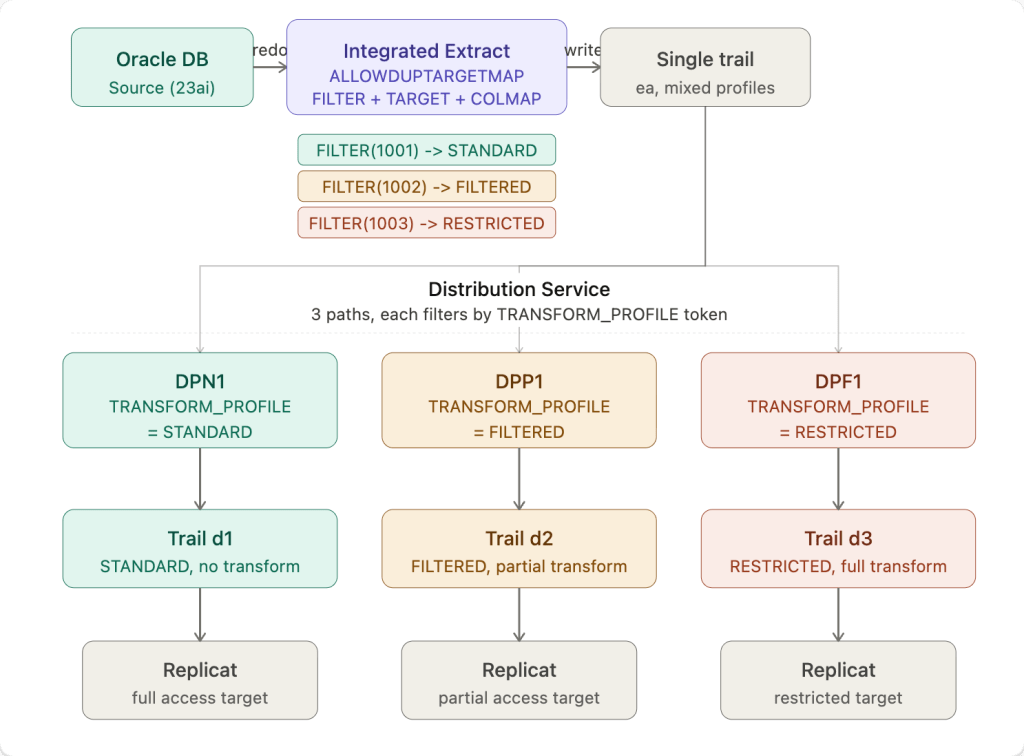
- Target 1 (STANDARD) — no transformation, all columns replicated as-is
- Target 2 (FILTERED) — partial transformation, phone name and number replaced with a sentinel value
- Target 3 (RESTRICTED) — full transformation, sensitive identifier columns suppressed and remaining fields replaced with sentinel values
In Classic GoldenGate this would typically be three separate PUMP processes each with their own MAP and COLMAP. The goal here is to replace all of that with a single Integrated Extract writing to a single trail, with the Distribution Service handling the routing to each target.
The architecture diagram above shows the full flow. The key insight is that transformation happens at the Extract -before data ever hits the trail, and the Distribution Service simply routes already-transformed records to the right target based on a user token stamped by the Extract.
The Extract Configuration
The Extract uses ALLOWDUPTARGETMAP to allow the same table to appear in multiple TABLE statements, with each entry using a FILTER clause to match specific rows, a TOKENS clause to stamp a routing token, and a COLMAP clause to apply the appropriate transformation:
EXTRACT EXTMASKUSERIDALIAS WEST DOMAIN OracleGoldenGateEXTTRAIL eaDDL INCLUDE MAPPEDALLOWDUPTARGETMAPTABLE HR.TEST_PHONEADDRESS, TARGET HR.TEST_PHONEADDRESS, FILTER (@STREQ (EXTENSION, '1001')), TOKENS (TRANSFORM_PROFILE='STANDARD'), COLMAP (USEDEFAULTS);TABLE HR.TEST_PHONEADDRESS, TARGET HR.TEST_PHONEADDRESS, FILTER (@STREQ (EXTENSION, '1002')), TOKENS (TRANSFORM_PROFILE='FILTERED'), COLMAP (USEDEFAULTS, PHONENAME='***TRANSFORMED***', PHONENUMBER='***TRANSFORMED***');TABLE HR.TEST_PHONEADDRESS, TARGET HR.TEST_PHONEADDRESS, FILTER (@STREQ (EXTENSION, '1003')), TOKENS (TRANSFORM_PROFILE='RESTRICTED'), COLMAP (USEDEFAULTS, EXTENSION=@IF(@COLSTAT(MISSING), @COLSTAT(NULL), '--UNKNOWN--'), NORMALIZEDNUMBER=@IF(@COLSTAT(MISSING), @COLSTAT(NULL), '--UNKNOWN--'), PHONENAME='*transformed*', PHONENUMBER='*transformed*');
Three things are happening per TABLE entry: the FILTER determines which rows match that entry based on the EXTENSION column value, the TOKENS clause stamps a TRANSFORM_PROFILE user token on every matching record written to the trail, and the COLMAP clause applies the transformation at write time.
The RESTRICTED entry uses @IF(@COLSTAT(MISSING), @COLSTAT(NULL), '--UNKNOWN--') for the EXTENSION and NORMALIZEDNUMBER columns rather than a straight @COLSTAT(MISSING). This is a defensive pattern that handles three scenarios cleanly:
- If the column value is already missing in the source record (which can happen with compressed supplemental logging or sparse capture), it maps to
NULLon the target rather than propagating a MISSING status that some Replicats may handle differently - If the column value is present, it is replaced with the literal sentinel string
'--UNKNOWN--', making it immediately obvious to any downstream consumer that the field was intentionally suppressed rather than genuinely null or absent - This approach is more Replicat-friendly than raw
@COLSTAT(MISSING)because it guarantees a defined output value in all cases, avoiding potential apply errors on targets that do not tolerate MISSING column status in non-key columns
This is a pattern worth adopting broadly for any full suppression use case in your migration from Classic PUMP logic.
Critical requirement: You must include TARGET HR.TEST_PHONEADDRESS explicitly in each TABLE statement. Without the explicit TARGET clause, COLMAP transformations are silently ignored on duplicate TABLE entries when using ALLOWDUPTARGETMAP. The FILTER and TOKENS clauses work correctly without it, but COLMAP will not be applied and the trail will contain the original untransformed column values with no error or warning.
##############################################################################################################################################. Create a extract with 3 different tokens and for the same table with different filters and write to the same trail file. ############################################################################################################################################### OGG deploymentogg_ip=localhostogg_port=9090# credentials (base64 for oggadmin:xxxxxxxxx)auth="xxxxxxxxx"# deployment aliasregion_name=WEST# Extract settingsextract_name=EXTMASKextract_file=ea# schema/tableschema=HRtable=TEST_PHONEADDRESSecho "Creating extract ${extract_name} on ${region_name} ......"echo "##########################################################"cat <<EOF >/tmp/${extract_name}.json{ "description": "Extract token fanout test", "config": [ "EXTRACT ${extract_name}", "USERIDALIAS ${region_name} DOMAIN OracleGoldenGate", "EXTTRAIL ${extract_file}", "DDL INCLUDE MAPPED", "ALLOWDUPTARGETMAP", "TABLE HR.TEST_PHONEADDRESS, TARGET HR.TEST_PHONEADDRESS, FILTER (@STREQ (EXTENSION, '1001')), TOKENS (MASK_PROFILE='NONE'), COLMAP (USEDEFAULTS);", "TABLE HR.TEST_PHONEADDRESS, TARGET HR.TEST_PHONEADDRESS, FILTER (@STREQ (EXTENSION, '1002')), TOKENS (MASK_PROFILE='PARTIAL'), COLMAP (USEDEFAULTS, PHONENAME='*masked*', PHONENUMBER='***MASKED***');", "TABLE HR.TEST_PHONEADDRESS, TARGET HR.TEST_PHONEADDRESS, FILTER (@STREQ (EXTENSION, '1003')), TOKENS (MASK_PROFILE='FULL'), COLMAP (USEDEFAULTS, EXTENSION=@IF(@COLSTAT(MISSING), @COLSTAT(NULL), '--UNKNOWN--'), NORMALIZEDNUMBER=@IF(@COLSTAT(MISSING), @COLSTAT(NULL), '--UNKNOWN--'), PHONENAME='*masked*', PHONENUMBER='*masked*');" ], "source": "tranlogs", "credentials": { "alias": "${region_name}" }, "registration": "default", "begin": "now", "targets": [ { "name": "${extract_file}", "sizeMB": 50 } ], "critical": false, "managedProcessSettings": "${region_name}-profile", "status": "running"}EOFcurl -k -X POST "https://${ogg_ip}:${ogg_port}/services/v2/extracts/${extract_name}" \ -H "Content-Type: application/json" \ -H "Accept: application/json" \ -H "Authorization: Basic xxxxxxxx" \ -d @/tmp/${extract_name}.json | jq
The Distribution Path Configuration
Three Distribution Paths read from the same single trail ea. Each path is configured with a ruleset that filters records based on the TRANSFORM_PROFILE token value, routing only matching records to its target trail. Note the two-rule pattern: the first rule explicitly includes records that match the token, and the second rule with "negate": true explicitly excludes everything else. Without the exclude rule, the Distribution Service default behavior passes all records through regardless of filter match.
for entry in "DPN1:d1:STANDARD" "DPP1:d2:FILTERED" "DPF1:d3:RESTRICTED"do dp_name=$(echo "$entry" | awk -F: '{print $1}') dp_filename=$(echo "$entry" | awk -F: '{print $2}') transform_profile=$(echo "$entry" | awk -F: '{print $3}') cat <<EOF >/tmp/${dp_name}.json{ "name": "${dp_name}", "source": { "uri": "trail://${ogg_ip}/services/${region_name}/distsrvr/v2/sources?trail=${extract_file}" }, "target": { "uri": "ws://${ogg_ip_remote}:9014/services/v2/targets?trail=${dp_filename}", "authenticationMethod": { "domain": "Network", "alias": "oggnet" } }, "ruleset": { "\$schema": "ogg:distPathRuleset", "name": "RS_${transform_profile}", "rules": [ { "\$schema": "ogg:distPathRule", "name": "TOK_${transform_profile}", "filters": [ { "\$schema": "ogg:distPathUserTokens", "userTokens": [ { "tokenName": "TRANSFORM_PROFILE", "tokenValue": "${transform_profile}", "matchType": "exactCaseSensitive" } ] } ], "actions": [ { "\$schema": "ogg:distPathAction", "command": "include" } ] }, { "\$schema": "ogg:distPathRule", "name": "EXCLUDE_REST", "filters": [ { "\$schema": "ogg:distPathUserTokens", "userTokens": [ { "tokenName": "TRANSFORM_PROFILE", "tokenValue": "${transform_profile}", "matchType": "exactCaseSensitive" } ], "negate": true } ], "actions": [ { "\$schema": "ogg:distPathAction", "command": "exclude" } ] } ] }, "begin": { "sequence": 0, "offset": 0 }, "status": "running"}EOF curl -k -X POST "https://${ogg_ip}:${ogg_port}/services/v2/sources/${dp_name}" \ -H "Content-Type: application/json" \ -H "Authorization: Basic ${auth}" \ -d @/tmp/${dp_name}.json | jqdone
Let’s walkthrough what this script is doing:
The full payload has four main sections: source, target, ruleset, and begin. Let me go through each one.
Source
"source": { "uri": "trail://localhost/services/WEST/distsrvr/v2/sources?trail=ea"}
This tells the Distribution Path where to read data from. The trail:// scheme points to the local Distribution Server (distsrvr) on the WEST deployment and says “read from trail file ea“. This is the same trail that the Extract is writing to. All three Distribution Paths point to the same source URI, they all consume from the same single trail.
Target
"target": { "uri": "ws://172.52.0.102:9014/services/v2/targets?trail=d1", "authenticationMethod": { "domain": "Network", "alias": "oggnet" }}
This tells the Distribution Path where to send data. The ws:// scheme means plain WebSocket (use wss:// for TLS). The remote Receiver Server at 172.52.0.102:9014 accepts the connection and writes the incoming records to trail d1 on the remote side. Each Distribution Path writes to a different trail (d1, d2, d3). The authenticationMethod references a credential store alias oggnet that holds the username and password for the remote GoldenGate deployment.
Ruleset
This is the heart of the filtering logic and has the most moving parts:
"ruleset": { "$schema": "ogg:distPathRuleset", "name": "RS_STANDARD", "rules": [ ... ]}
The ruleset is a container that holds one or more rules. The $schema value ogg:distPathRuleset is mandatory, it tells the API validator what type of object this is. Think of the ruleset as the policy document for this Distribution Path.
Inside rules you have two rule objects. Here is the first one:
{ "$schema": "ogg:distPathRule", "name": "TOK_STANDARD", "filters": [ { "$schema": "ogg:distPathUserTokens", "userTokens": [ { "tokenName": "TRANSFORM_PROFILE", "tokenValue": "STANDARD", "matchType": "exactCaseSensitive" } ] } ], "actions": [ { "$schema": "ogg:distPathAction", "command": "include" } ]}
This rule says: for every record that arrives from trail ea, check if the user token named TRANSFORM_PROFILE has the value STANDARD (exact case sensitive match). If it does, the action is include, meaning forward this record to the target.
The $schema values at each level (ogg:distPathRule, ogg:distPathUserTokens, ogg:distPathAction) are all mandatory, the API uses them to validate the structure of each nested object.
Now here is the second rule, the one that makes the filtering actually work:
{ "$schema": "ogg:distPathRule", "name": "EXCLUDE_REST", "filters": [ { "$schema": "ogg:distPathUserTokens", "userTokens": [ { "tokenName": "TRANSFORM_PROFILE", "tokenValue": "STANDARD", "matchType": "exactCaseSensitive" } ], "negate": true } ], "actions": [ { "$schema": "ogg:distPathAction", "command": "exclude" } ]}
This is identical to the first rule except for two things: "negate": true on the filter, and "command": "exclude" on the action. The negate flag flips the match, instead of matching records WHERE TRANSFORM_PROFILE = STANDARD, it matches records WHERE TRANSFORM_PROFILE != STANDARD. The action exclude then drops those records and does not forward them.
This second rule is critical. Without it, the Distribution Service default behavior is to pass all records through regardless of whether the first rule matched. The include rule alone is not enough, you need the explicit exclude rule to drop non-matching records. Think of it as a whitelist that needs both an “allow this” rule and a “deny everything else” rule to actually enforce the boundary.
Begin
"begin": { "sequence": 0, "offset": 0}
This tells the Distribution Path where in the trail to start reading. sequence: 0, offset: 0 means start from the very beginning of trail file ea000000000. In production you would typically use "begin": "now" to start from the current position, or a specific SCN/timestamp if you need to start from a known point after a failover or restart.
Putting it all together
The flow for a single record looks like this. The Extract writes a record to trail ea and stamps TRANSFORM_PROFILE=STANDARD as a user token. All three Distribution Paths are reading that same trail. When DPN1 sees the record it evaluates rule 1, token matches STANDARD, include it, forward to d1. When DPP1 sees the same record it evaluates rule 1, token does not match FILTERED, skip. It evaluates rule 2, token does not match FILTERED (negate=true so this IS a match), exclude it, drop it. DPF1 does the same and also drops it. So only DPN1 forwards that record.
The same logic in reverse applies when a FILTERED or RESTRICTED record comes through, only the matching path forwards it, the other two drop it.
Pro Tip: Always create a repeatable test case with GoldenGate APIs.
Table Creation Example:
DROP TABLE HR.TEST_PHONEADDRESS;CREATE TABLE HR.TEST_PHONEADDRESS ( ID NUMBER PRIMARY KEY, EXTENSION VARCHAR2(20), NORMALIZEDNUMBER VARCHAR2(30), PHONENAME VARCHAR2(100), PHONENUMBER VARCHAR2(30), COMMENTS VARCHAR2(200), CREATED_AT TIMESTAMP DEFAULT SYSTIMESTAMP);INSERT INTO HR.TEST_PHONEADDRESS(ID, EXTENSION, NORMALIZEDNUMBER, PHONENAME, PHONENUMBER, COMMENTS)VALUES(1, '1001', '15551234567', 'Alice Desk', '5551234567', 'baseline row 1');INSERT INTO HR.TEST_PHONEADDRESS(ID, EXTENSION, NORMALIZEDNUMBER, PHONENAME, PHONENUMBER, COMMENTS)VALUES(2, '1002', '15557654321', 'Bob Office', '5557654321', 'baseline row 2');INSERT INTO HR.TEST_PHONEADDRESS(ID, EXTENSION, NORMALIZEDNUMBER, PHONENAME, PHONENUMBER, COMMENTS)VALUES(3, '1003', '15559871234', 'Carol Mobile', '5559871234', 'baseline row 3');COMMIT;
Validating the Results
After running the test inserts and letting the Distribution Paths forward records to the remote receiver, logdump confirms the following across all three target trails:
| Trail | Token | PHONENAME | PHONENUMBER | EXTENSION | NORMALIZEDNUMBER |
|---|---|---|---|---|---|
| d1 | STANDARD | Alice Desk (original) | 5551234567 (original) | present | present |
| d2 | FILTERED | ***TRANSFORMED*** | ***TRANSFORMED*** | present | present |
| d3 | RESTRICTED | *transformed* | *transformed* | --UNKNOWN-- | --UNKNOWN-- |
To validate this yourself, use logdump with the heredoc approach to inspect each target trail:
logdump << EOFGHDR ONUSERTOKEN ONDETAIL ONFILTER INCLUDE FILENAME HR.TEST_PHONEADDRESSOPEN /path/to/dirdat/d1000000000NEXTNEXTNEXTEOF
Check that the User tokens section shows the correct TRANSFORM_PROFILE value per record, and that the column data matches the expected transformation level for that trail. The extract report also provides a quick sanity check after stopping the extract, grep for the TABLE STATISTICS section to confirm each TABLE entry processed the expected row count:
docker exec <container> grep -A3 -E "From table HR\.TEST" \ /u02/Deployment/var/lib/report/EXTMASK.rpt
You should see exactly 1 insert per TABLE entry, confirming the FILTER is correctly routing one row per mapping.
Applicability to Classic PUMP Migration
This pattern is a direct Microservices equivalent of the Classic multi-PUMP fan-out architecture. The mapping is straightforward:
| Classic | Microservices |
|---|---|
| Multiple PUMP processes | Single Extract with multiple TABLE entries |
| PUMP MAP with COLMAP | Extract TABLE with TARGET + FILTER + COLMAP |
| PUMP routing to different trails | Distribution Path token-based ruleset |
| Per-PUMP parameter file maintenance | Single Extract parameter file |
For customers with hundreds of PUMP processes implementing filtering and transformation logic, this pattern offers a significant reduction in process footprint and operational complexity. Rather than maintaining N PUMP processes with N MAP configurations, you maintain one Extract with N TABLE entries and one Distribution Path per target, all driven by configuration with no additional processes.
The main constraint to keep in mind: this pattern applies when each source row maps to exactly one transformation profile based on a column value. If your use case requires the same row to be replicated to multiple targets simultaneously with different transformations applied per copy, a different approach is needed since the trail stores one image per row.
For the majority of PUMP-based transformation and routing patterns seen in the field, the single-extract token fanout approach is a clean, maintainable replacement that significantly accelerates the path to full Microservices Architecture adoption.
Conclusion
The single-extract token-based fanout pattern delivers several concrete benefits that make it worth adopting as a standard approach in your Microservices migration.
Reduced process footprint. What previously required N PUMP processes, each with its own parameter file, checkpoint, and monitoring overhead, now runs as a single Extract process writing to a single trail. Fewer processes means fewer failure points, simpler monitoring, and less infrastructure to maintain.
Source-side transformation. Because the COLMAP transformation is applied at the Extract level before data is written to the trail, each target receives only the data it is supposed to see. Sensitive or restricted field values never exist in clear form beyond the point where the transformation profile is applied, the trail itself already carries the transformed version.
Configuration-driven routing. The Distribution Service ruleset approach means that adding a new transformation profile or a new target requires updating configuration, not deploying new processes. A new TABLE entry in the Extract, a new token value, and a new Distribution Path is all it takes to onboard an additional target with its own transformation requirements.
Single source of truth. With all transformation logic consolidated into one Extract parameter file, there is one place to look when a column mapping needs to change, one place to audit for compliance review, and one place to update when a table definition evolves. In large Classic environments with hundreds of PUMP files, this alone is a significant operational improvement.
Migration momentum. For teams migrating from Classic to Microservices Architecture, each PUMP process consolidated into this pattern is one less process to carry forward. The pattern scales, the same approach works whether you have three transformation profiles or thirty.
 Alex Lima
Leave a comment