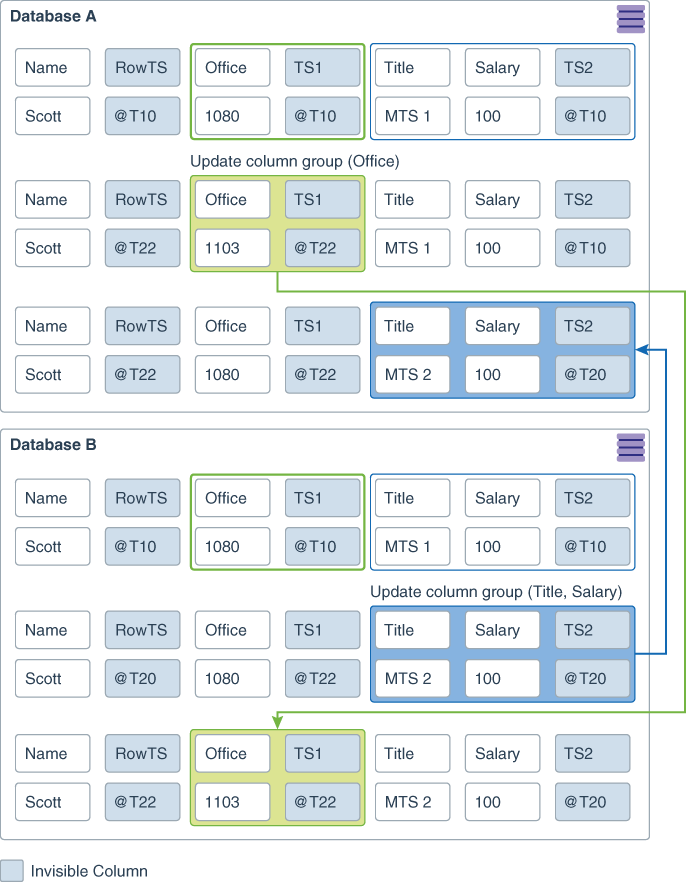
Automatic Conflict Detection and Resolution is critical to any active/active and multi-master GoldenGate implementation. The following are the most important ACDR views:
DBA_APPLY_ERROR_MESSAGES: Displays information about the individual messages in all the error transactions generated by all applied processes in the database.
DBA_GG_AUTO_CDR_TABLES: Provides details about all the tables configured for Oracle GoldenGate automatic conflict detection and resolution (CDR).
DBA_GG_AUTO_CDR_COLUMNS: Provides details about all the Oracle GoldenGate automatic conflict detection and resolution (CDR) columns in the database.
DBA_GG_AUTO_CDR_COLUMN_GROUPS: This is a dynamic view that provides information about all of the Oracle GoldenGate automatic conflict detection and resolution (CDR) column groups in the database.
DBA_GG_AUTO_CDR_CONFLICTS: This view displays information about all of the conflicts that have been detected by ACDR.
DBA_GG_AUTO_CDR_COLUMNS: This view displays information about all of the columns that are configured for ACDR conflict detection and resolution.
DBA_GG_AUTO_CDR_RESOLUTIONS: This view displays information about all of the conflict resolutions that have been performed by ACDR.
DBA_GG_AUTO_CDR_SETTINGS: This view displays information about the ACDR configuration.
These views can be used to monitor the status of ACDR and to troubleshoot any problems that occur.
If you are not yet taking advantage of the GoldenGate active/active feature, I highly recommend you review it and send me any questions. Making your applications highly available, fault-tolerant, and performing flawlessly can provide you with many benefits.
For more information about the ACDR views, please refer to the Oracle GoldenGate documentation.


 Alex Lima
Leave a reply to olufemitemowo Cancel reply