
When working with multiple Oracle GoldenGate Service Managers and deployments, navigating AdminClient can be tedious; you need to remember the ports, URLs, and credentials for each environment.
I built a Bash script that discovers all GoldenGate deployments from one or more Service Managers, lists them in a nicely formatted menu, and lets you connect to AdminClient instantly.
It works with GoldenGate Microservices and handles both ServiceManager and deployment adminsrvr endpoints.
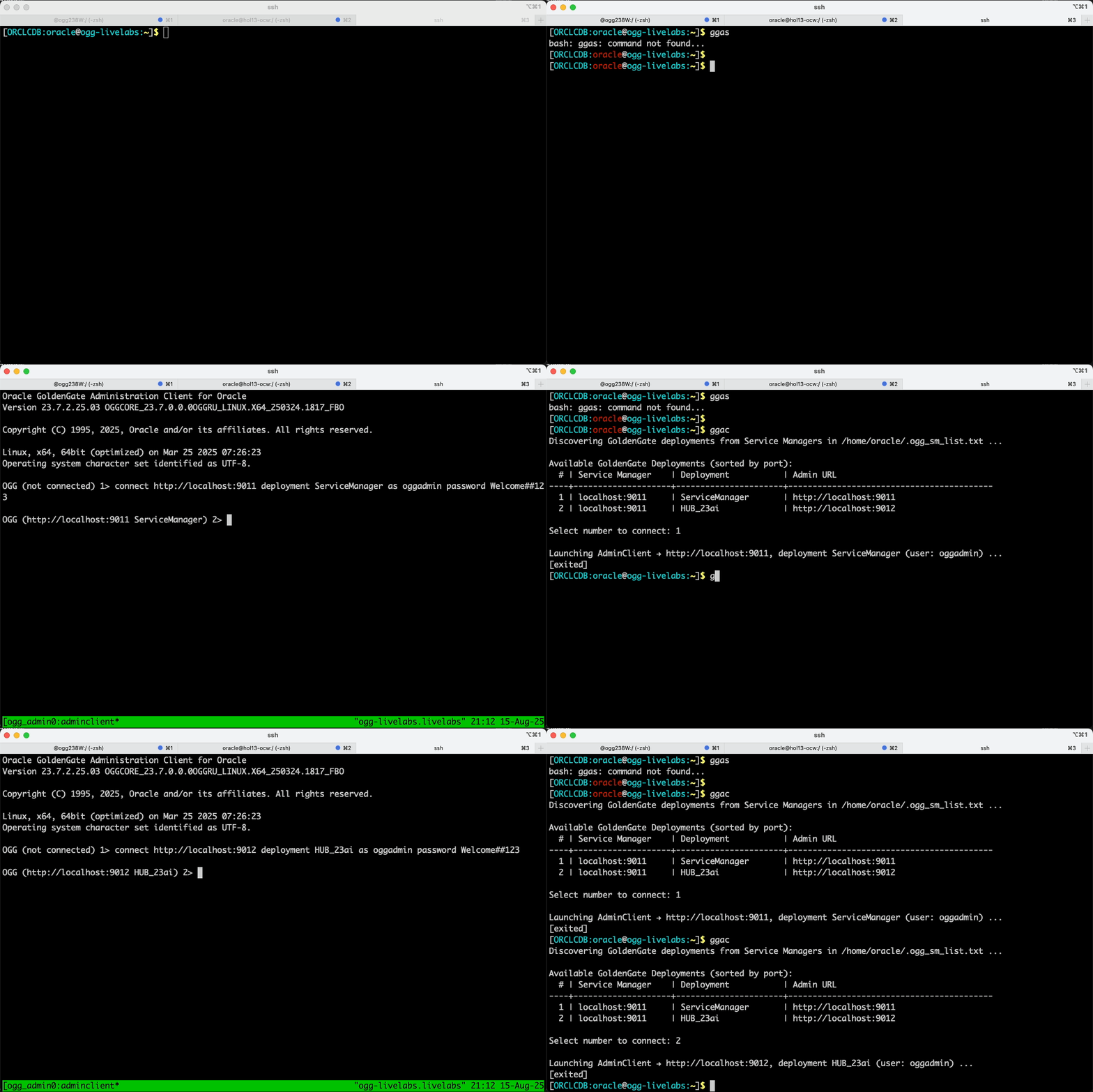
The Problem
If you manage multiple GoldenGate environments, you often:
- Forget which port each deployment’s Admin Server runs on
- Need to manually type long connect commands into AdminClient
- Bouncing between environments, which slows you down
This script solves it by:
- Automatically discovering deployments and ports
- Displaying a clean, sortable menu
- Launching AdminClient in tmux, already connected
- Supporting multiple Service Managers in one run
The Script
Save this as ~/gg_adminclient_picker.sh and make it executable:
#!/usr/bin/env bash
# gg_adminclient_picker.sh — tmux-based AdminClient picker

set -euo pipefail

OGG_HOME="/u01/ogg/23.7"
ADMINCLIENT_BIN="${ADMINCLIENT_BIN:-$OGG_HOME/bin/adminclient}"
SM_LIST_FILE="${SM_LIST_FILE:-$HOME/.ogg_sm_list.txt}"

[[ -x "$ADMINCLIENT_BIN" ]] || { echo "ERROR: $ADMINCLIENT_BIN not found/executable"; exit 1; }
[[ -f "$SM_LIST_FILE"   ]] || { echo "ERROR: SM list not found: $SM_LIST_FILE"; exit 1; }
for cmd in jq curl tmux; do command -v "$cmd" >/dev/null || { echo "ERROR: need $cmd (dnf install -y jq curl tmux)"; exit 1; }; done

trim(){ sed -E 's/^[[:space:]]+|[[:space:]]+$//g'; }

discover_admin_url() {
  local sm_base="$1" dep="$2" user="$3" pass="$4"
  sm_base="${sm_base%/}"
  local sm_scheme sm_host sm_port
  sm_scheme=$(echo "$sm_base" | sed -E 's#^(https?)://.*#\1#')
  sm_host=$(echo "$sm_base"   | sed -E 's#^https?://([^/:]+).*$#\1#')
  sm_port=$(echo "$sm_base"   | sed -E 's#^https?://[^/:]+:([0-9]+).*$#\1#')

  local svc_json
  if ! svc_json=$(curl -sS --fail --user "${user}:${pass}" "${sm_base}/services/v2/deployments/${dep}/services"); then
    echo ""; return 0
  fi

  local href
  href=$(echo "$svc_json" | jq -r '
    [ .response.items[]?, .items[]? ] | map(select(. != null)) |
    (map(select(((.type? // .serviceType? // .name? // .id? // "") | test("(^|\\b)admin( service)?(\\b|$)"; "i")))) |
       (.[0]?.links[]? | select(.rel=="self" or .rel=="canonical") | .href)
       // (.[0]?.href // .[0]?.url // .[0]?.endpoint // empty))
  ' | grep -E '^https?://' | head -n1 || true)

  if [[ -z "$href" ]]; then
    href=$(echo "$svc_json" | jq -r '
      [ .response.items[]?, .items[]? ] | map(.links[]? | .href? // empty) |
      .[]? | select(test("^https?://"))
    ' | while read -r u; do
      p=$(echo "$u" | sed -E 's#^https?://[^/:]+:([0-9]+).*#\1#')
      [[ -n "$p" && "$p" != "$sm_port" ]] && { echo "$u"; break; }
    done)
  fi

  if [[ -n "$href" ]]; then
    echo "$href" | sed -E 's#^(https?://[^/]+).*$#\1#'
    return 0
  fi

  echo "${sm_scheme}://${sm_host}:${sm_port}"
}

declare -a MENU CONNECT_URLS DEPLOY_NAMES USERS PASSES PORTS

echo "Discovering GoldenGate deployments from Service Managers in $SM_LIST_FILE ..."
while IFS= read -r line; do
  line=$(trim <<<"$line"); [[ -z "$line" || "$line" =~ ^# ]] && continue
  IFS='|' read -r sm_base sm_user sm_pass <<<"$line"

  if ! dep_json=$(curl -sS --fail --user "${sm_user}:${sm_pass}" "${sm_base%/}/services/v2/deployments"); then
    echo "   Cannot reach $sm_base — skipping."; continue
  fi

  mapfile -t deps < <(echo "$dep_json" | jq -r '
    (.response.items[]?.name // empty),
    (.items[]?.name // empty),
    (.deployments[]? // empty)
  ' | sed '/^$/d')

  sm_host=$(echo "$sm_base" | sed -E 's#^https?://([^/]+).*#\1#')
  for dep in "${deps[@]}"; do
    admin_url=$(discover_admin_url "$sm_base" "$dep" "$sm_user" "$sm_pass")
    port=$(echo "$admin_url" | sed -E 's#^https?://[^/:]+:([0-9]+).*#\1#')
    MENU+=("$sm_host|$dep|$admin_url")
    CONNECT_URLS+=("$admin_url")
    DEPLOY_NAMES+=("$dep")
    USERS+=("$sm_user")
    PASSES+=("$sm_pass")
    PORTS+=("$port")
  done
done < "$SM_LIST_FILE"

if [[ ${#MENU[@]} -eq 0 ]]; then echo "ERROR: No deployments found."; exit 2; fi

# Sort by port
sorted_idx=($(for i in "${!PORTS[@]}"; do echo "${PORTS[$i]} $i"; done | sort -n | awk '{print $2}'))

printf "\nAvailable GoldenGate Deployments (sorted by port):\n"
printf "  # | %-18s | %-20s | %-40s\n" "Service Manager" "Deployment" "Admin URL"
printf "----+--------------------+----------------------+------------------------------------------\n"
for rank in "${!sorted_idx[@]}"; do
  i="${sorted_idx[$rank]}"
  sm_host="${MENU[$i]%%|*}"
  rest="${MENU[$i]#*|}"; dep="${rest%%|*}"
  admin_url="${rest##*|}"
  printf " %2d | %-18s | %-20s | %-40s\n" "$((rank+1))" "$sm_host" "$dep" "$admin_url"
done
echo

read -rp "Select number to connect: " choice
idx="${sorted_idx[$((choice-1))]}"
url="${CONNECT_URLS[$idx]}"; dep="${DEPLOY_NAMES[$idx]}"; user="${USERS[$idx]}"; pass="${PASSES[$idx]}"

echo; echo "Launching AdminClient → $url, deployment $dep (user: $user) ..."
sess="ogg_adminclient_$(echo "${url}_${dep}" | tr -cd '[:alnum:]_-' | sed 's/://g')"
tmux has-session -t "$sess" 2>/dev/null && tmux kill-session -t "$sess"
TMUX= tmux new-session -d -s "$sess" "$ADMINCLIENT_BIN"
sleep 0.3
tmux send-keys -t "$sess" "connect $url deployment $dep as $user password $pass" Enter
TMUX= tmux attach -t "$sess"
Configuration File
The script reads from a ~/.ogg_sm_list.txt file with:
http://localhost:9011|oggadmin|Welcome##123
http://ogg-prod.example.com:9011|oggadmin|ProdPassword
Installation
chmod +x ~/gg_adminclient_picker.sh
echo "alias ggac='~/gg_adminclient_picker.sh'" >> ~/.bashrc
source ~/.bashrc
Usage
$ ggac
Example output:
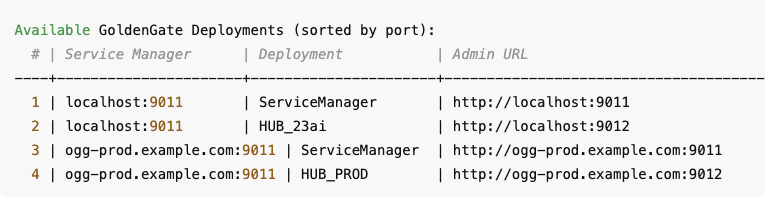
Available GoldenGate Deployments (sorted by port):
  # | Service Manager    | Deployment           | Admin URL
----+--------------------+----------------------+------------------------------------------
  1 | localhost:9011     | ServiceManager       | http://localhost:9011
  2 | localhost:9011     | HUB_23ai                 | http://localhost:9012
  3 | ogg-prod.example.com:9011 | ServiceManager  | http://ogg-prod.example.com:9011
  4 | ogg-prod.example.com:9011 | HUB_PROD        | http://ogg-prod.example.com:9012

Select number to connect: 2
Launching AdminClient → http://localhost:9012, deployment HUB_23ai (user: oggadmin) ...

Oracle GoldenGate Administration Client for Oracle
Version 23.7.2.25.03 OGGCORE_23.7.0.0.0OGGRU_LINUX.X64_250324.1817_FBO

Copyright (C) 1995, 2025, Oracle and/or its affiliates. All rights reserved.

Linux, x64, 64bit (optimized) on Mar 25 2025 07:26:23
Operating system character set identified as UTF-8.

OGG (not connected) 1> connect http://localhost:9012 deployment HUB_23ai as oggadmin password Welcome##123

OGG (http://localhost:9012 HUB_23ai) 2>
Tips
- Works with GoldenGate 23.x+ Microservices.
- You can manage dozens of Service Managers from one menu.
- Use tmux commands to detach and reattach without losing your AdminClient session.


 Alex Lima
Leave a comment