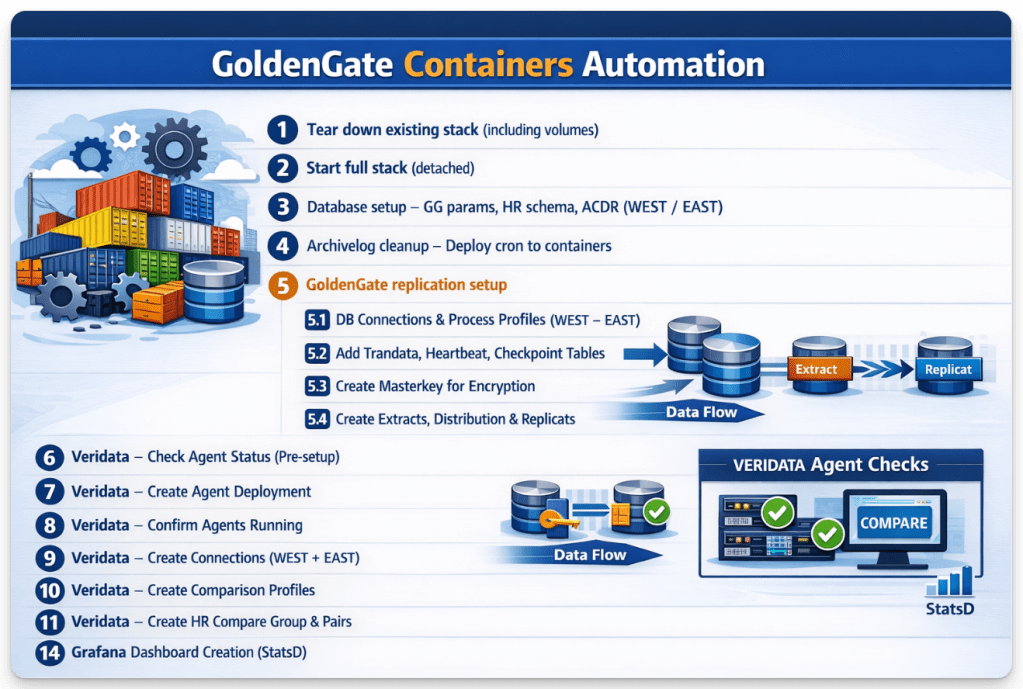
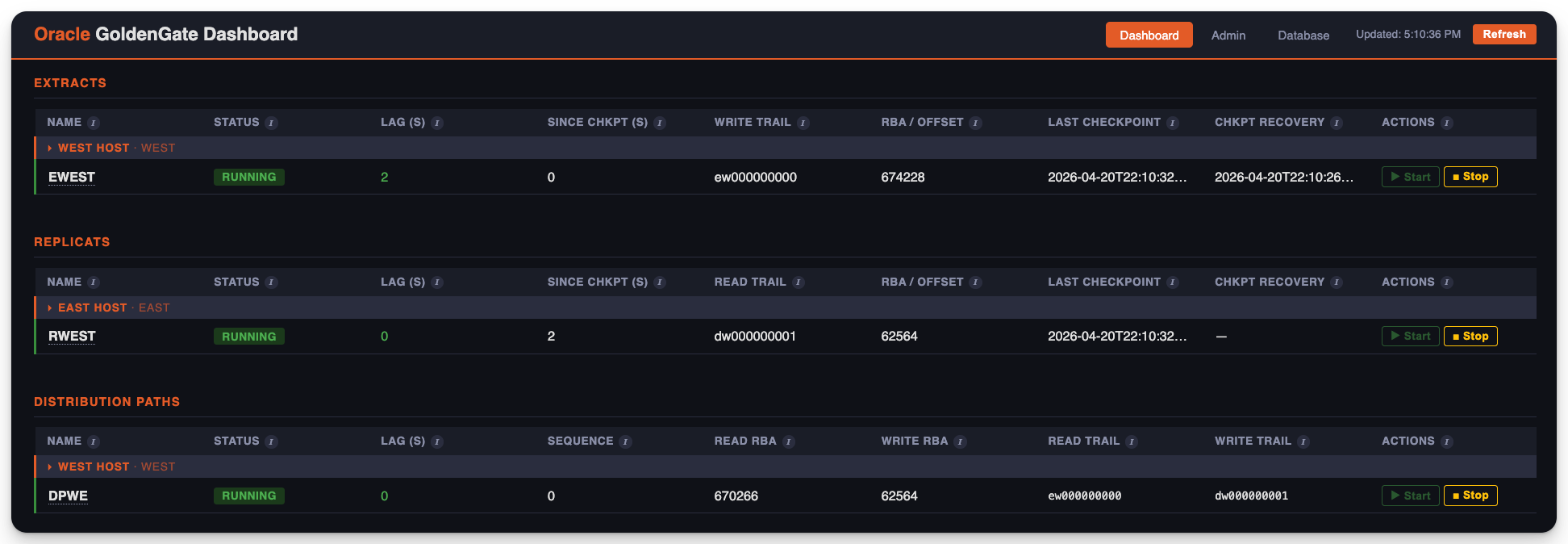
GoldenGate Containers Automation brings together Docker orchestration and API-driven workflows to deliver a fully repeatable, end-to-end data replication environment. From tearing down and rebuilding the entire stack to configuring databases, enabling replication, and validating data consistency, every step is streamlined into a cohesive automated flow. The process doesn’t stop at setup it extends into operational excellence with scheduled Veridata comparisons and integrated monitoring through Grafana, giving clear visibility into system health and data accuracy across WEST and EAST environments.
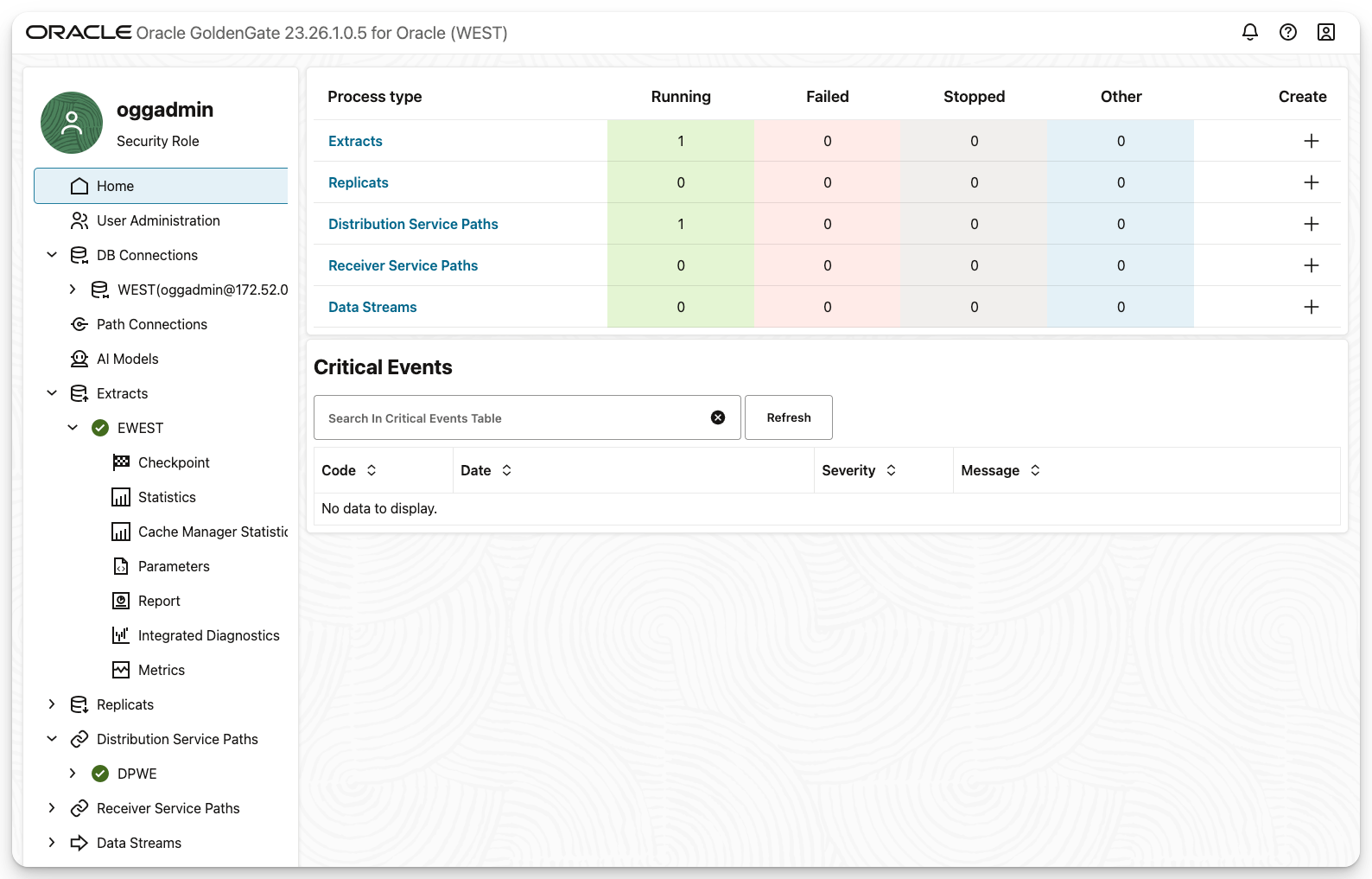
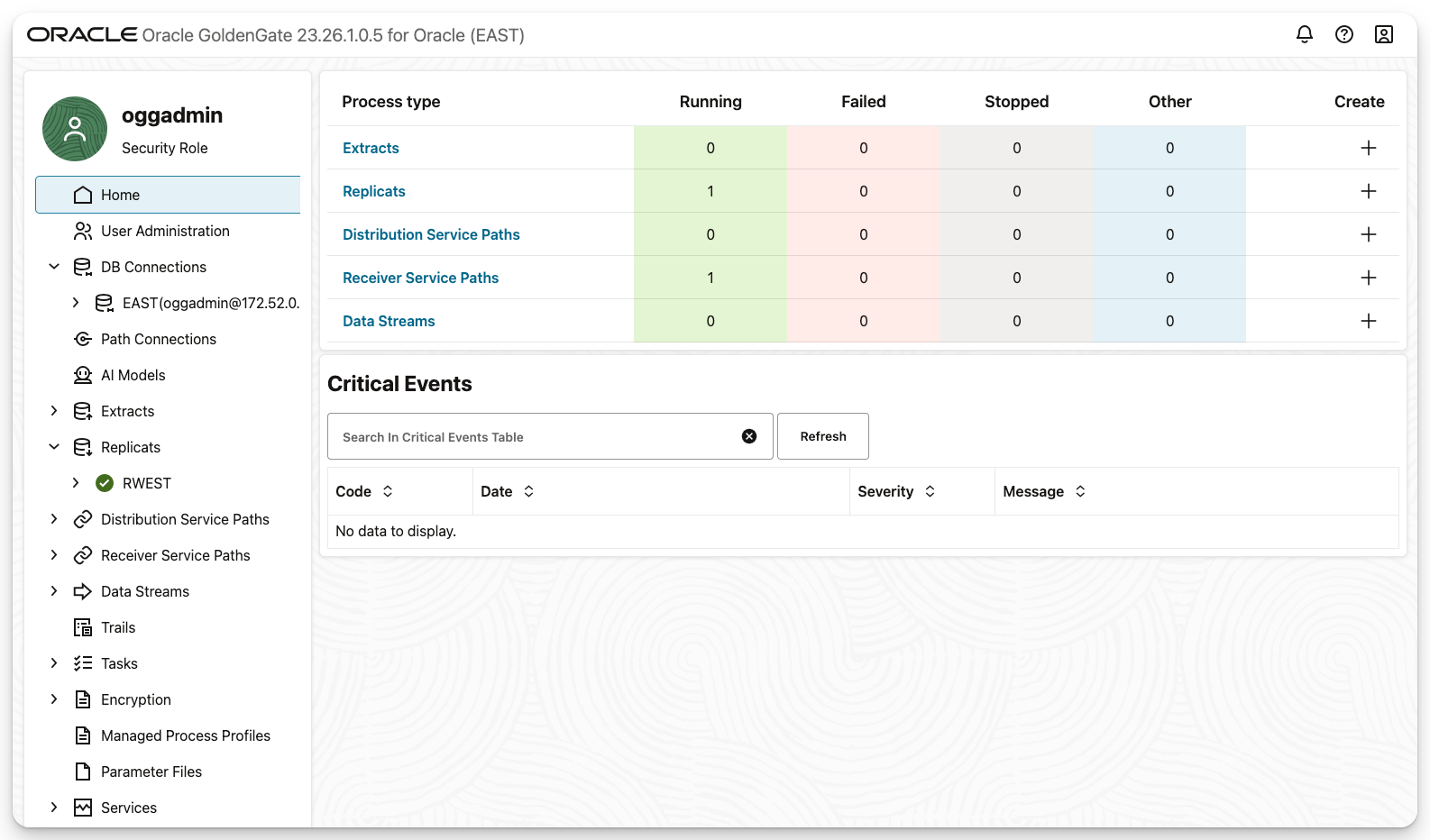
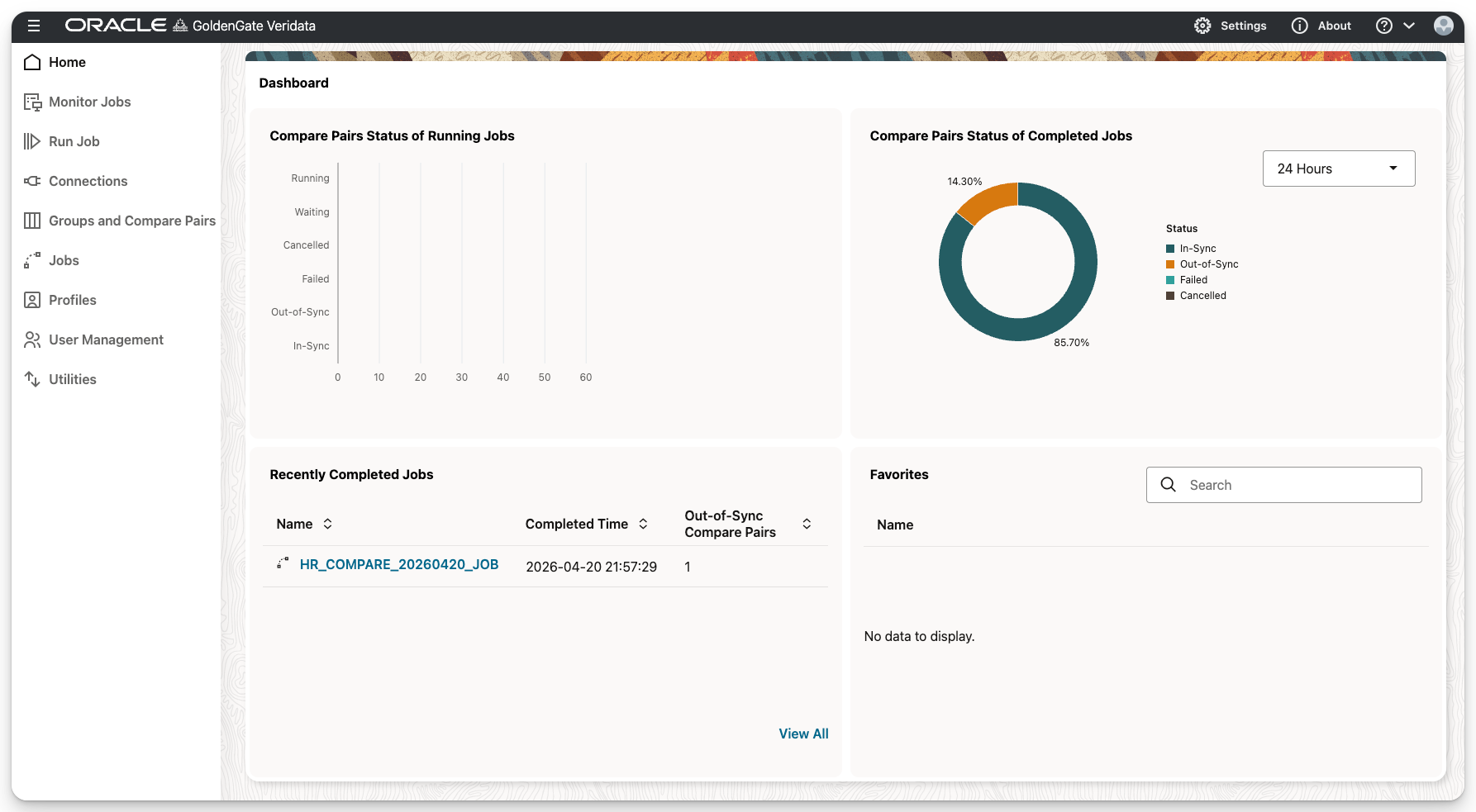
What makes this especially powerful is the combination of containerization and automation: environments can be spun up, validated, and monitored with minimal manual effort, reducing setup time and eliminating configuration drift. It’s a practical approach to modern data engineering fast, consistent, and reliable. I love building this kind of automation with Docker and APIs. If you want to see it in action, reach out I’d be happy to walk you through a live demo. Screenshots are at the end.
You can find all code necessary for this in my GitHub: https://github.com/alexlimahub/goldengate-26ai-docker-lab
alexlima@Alexs-MacBook-Pro compose238aiGG % ./0_start_lab.sh
================================================================
Oracle GoldenGate Lab — Full Stack Start
Mon Apr 20 15:17:50 CDT 2026
================================================================
================================================================
Step 1: Tear down existing stack (including volumes)
================================================================
>>> Running: docker compose down -v
[+] down 8/8
Container dbWEST Removed 5.3s
Container oggWEST Removed 10.9s
Container oggEAST Removed 11.1s
Container tig-aio Removed 2.0s
Container dbEAST Removed 5.5s
Container oggvdt Removed 0.5s
Volume compose238aigg_veridata_data Removed 0.2s
Network compose238aigg_ogg_docker_network_v1 Removed 0.6s
[OK] Step 1 complete (12s)
================================================================
Step 2: Start full stack (detached)
================================================================
>>> Running: docker compose up -d
WARN[0000] No services to build
[+] up 8/8
Network compose238aigg_ogg_docker_network_v1 Created 0.0s
Volume compose238aigg_veridata_data Created 0.0s
Container oggvdt Created 2.2s
Container oggWEST Created 0.2s
Container oggEAST Created 0.2s
Container dbWEST Created 0.2s
Container dbEAST Created 0.1s
Container tig-aio Created 0.2s
[OK] Step 2 complete (3s)
================================================================
Step 3: Database setup — GG params, HR schema, ACDR
================================================================
>>> Running: bash /Users/alexlima/Library/CloudStorage/OneDrive-OracleCorporation/ORACLE_FTE_Files/LABS/Docker/compose238aiGG/post_compose_setup.sh
================================================================
Oracle GoldenGate — Post-Compose Database Setup
Mon Apr 20 15:18:05 CDT 2026
================================================================
================================================================
Downloading oracle-samples/db-sample-schemas (latest release)
================================================================
>>> Resolving latest release URL from GitHub API...
[OK] URL: https://api.github.com/repos/oracle-samples/db-sample-schemas/zipball/v23.3
>>> Downloading ZIP...
-=O=- # # # #
>>> Unzipping...
[OK] Schemas extracted: /var/folders/kg/0htg03q577x58d8hwf0tq3zr0000gp/T/tmp.K86oRcXobQ/oracle-samples-db-sample-schemas-e3325a8/
================================================================
Setting up WEST (container: dbWEST)
================================================================
[OK] Container dbWEST is running
>>> Waiting for FREEPDB1 to be READ WRITE in WEST (timeout: 300s)...
[OK] WEST FREEPDB1 is READ WRITE and ready (15s)
>>> Applying CDB-level GoldenGate configuration in WEST...
SQL*Plus: Release 23.26.1.0.0 - Production on Mon Apr 20 20:18:24 2026
Version 23.26.1.0.0
Copyright (c) 1982, 2025, Oracle. All rights reserved.
Connected to:
Oracle AI Database 26ai Free Release 23.26.1.0.0 - Develop, Learn, and Run for Free
Version 23.26.1.0.0
SQL> SQL> SQL> SQL> SQL> SQL> SQL> SQL> SQL> SQL>
System altered.
SQL> SQL> SQL>
System altered.
SQL> SQL> SQL>
Database altered.
SQL> SQL> SQL>
Database altered.
SQL> SQL> Disconnected from Oracle AI Database 26ai Free Release 23.26.1.0.0 - Develop, Learn, and Run for Free
Version 23.26.1.0.0
[OK] CDB-level GoldenGate configuration applied in WEST
>>> Copying HR schema files into WEST (/tmp/hr_schema)...
Successfully copied 86kB to dbWEST:/tmp/hr_schema/
[OK] HR schema files copied to /tmp/hr_schema in dbWEST
>>> Creating users and installing HR schema in WEST / FREEPDB1...
SQL*Plus: Release 23.26.1.0.0 - Production on Mon Apr 20 20:18:25 2026
Version 23.26.1.0.0
Copyright (c) 1982, 2025, Oracle. All rights reserved.
Connected to:
Oracle AI Database 26ai Free Release 23.26.1.0.0 - Develop, Learn, and Run for Free
Version 23.26.1.0.0
SQL> SQL> SQL> SQL> SQL> SQL> SQL> SQL> SQL> SQL> SQL> SQL> SQL> SQL>
Session altered.
SQL> SQL> SQL> SQL> SQL> SQL> SQL> 2 3
User created.
SQL> SQL>
Grant succeeded.
....
SQL>
Grant succeeded.
SQL>
Grant succeeded.
SQL>
Grant succeeded.
SQL> SQL> SQL> SQL> SQL> SQL> SQL>
User created.
SQL>
Grant succeeded.
SQL>
Grant succeeded.
SQL> SQL> SQL> SQL> SQL>
Session altered.
SQL>
Session altered.
SQL>
Session altered.
SQL> SQL> SQL> rem
SQL> rem Copyright (c) 2023 Oracle
SQL> rem
SQL> rem Permission is hereby granted, free of charge, to any person obtaining a
SQL> rem copy of this software and associated documentation files (the "Software"),
SQL> rem to deal in the Software without restriction, including without limitation
SQL> rem the rights to use, copy, modify, merge, publish, distribute, sublicense,
SQL> rem and/or sell copies of the Software, and to permit persons to whom the
SQL> rem Software is furnished to do so, subject to the following conditions:
SQL> rem
SQL> rem The above copyright notice and this permission notice shall be included in
SQL> rem all copies or substantial portions rem of the Software.
SQL> rem
SQL> rem THE SOFTWARE IS PROVIDED "AS IS", WITHOUT WARRANTY OF ANY KIND, EXPRESS OR
SQL> rem IMPLIED, INCLUDING BUT NOT LIMITED TO THE WARRANTIES OF MERCHANTABILITY,
SQL> rem FITNESS FOR A PARTICULAR PURPOSE AND NONINFRINGEMENT. IN NO EVENT SHALL
SQL> rem THE AUTHORS OR COPYRIGHT HOLDERS BE LIABLE FOR ANY CLAIM, DAMAGES OR OTHER
SQL> rem LIABILITY, WHETHER IN AN ACTION OF CONTRACT, TORT OR OTHERWISE, ARISING
SQL> rem FROM, OUT OF OR IN CONNECTION WITH THE SOFTWARE OR THE USE OR OTHER
SQL> rem DEALINGS IN THE SOFTWARE.
SQL> rem
SQL> rem NAME
SQL> rem hr_create.sql - Creates schema objects for HR (Human Resources) schema
SQL> rem
SQL> rem DESCRIPTION
SQL> rem This script creates tables, associated constraints,
SQL> rem indexes, and comments in the HR schema.
SQL> rem
SQL> rem SCHEMA VERSION
SQL> rem 21
SQL> rem
SQL> rem RELEASE DATE
SQL> rem 03-FEB-2022
SQL> rem
SQL> rem SUPPORTED with DB VERSIONS
SQL> rem 19c and higher
SQL> rem
SQL> rem MAJOR CHANGES IN THIS RELEASE
SQL> rem
SQL> rem
SQL> rem SCHEMA DEPENDENCIES AND REQUIREMENTS
SQL> rem This script is called from the hr_install.sql script
SQL> rem
SQL> rem INSTALL INSTRUCTIONS
SQL> rem Run the hr_install.sql script to call this script
SQL> rem
SQL> rem --------------------------------------------------------------------------
>
SQL> SET FEEDBACK 1
SQL> SET NUMWIDTH 10
SQL> SET LINESIZE 80
SQL> SET TRIMSPOOL ON
SQL> SET TAB OFF
SQL> SET PAGESIZE 100
SQL> SET ECHO OFF
****** Creating REGIONS table ....
Table created.
Index created.
Table altered.
****** Creating COUNTRIES table ....
Table created.
Table altered.
****** Creating LOCATIONS table ....
Table created.
Index created.
Table altered.
Sequence created.
****** Creating DEPARTMENTS table ....
Table created.
Index created.
Table altered.
Sequence created.
****** Creating JOBS table ....
Table created.
Index created.
Table altered.
****** Creating EMPLOYEES table ....
Table created.
Index created.
Table altered.
Table altered.
Sequence created.
****** Creating JOB_HISTORY table ....
Table created.
Index created.
Table altered.
****** Creating EMP_DETAILS_VIEW view ...
View created.
****** Creating indexes ...
Index created.
Index created.
...
Index created.
Index created.
SQL>
Session altered.
****** Populating REGIONS table ....
PL/SQL procedure successfully completed.
****** Populating COUNTRIES table ....
PL/SQL procedure successfully completed.
****** Populating LOCATIONS table ....
PL/SQL procedure successfully completed.
****** Populating DEPARTMENTS table ....
Table altered.
PL/SQL procedure successfully completed.
****** Populating JOBS table ....
PL/SQL procedure successfully completed.
****** Populating EMPLOYEES table ....
PL/SQL procedure successfully completed.
****** Populating JOB_HISTORY table ....
PL/SQL procedure successfully completed.
Commit complete.
Table altered.
SQL>
Procedure created.
Trigger created.
Trigger altered.
Procedure created.
Trigger created.
Commit complete.
SQL> SQL> Disconnected from Oracle AI Database 26ai Free Release 23.26.1.0.0 - Develop, Learn, and Run for Free
Version 23.26.1.0.0
[OK] PDB setup and HR schema installed in WEST
>>> Enabling Auto-CDR (ACDR) on all HR tables in WEST / FREEPDB1...
SQL*Plus: Release 23.26.1.0.0 - Production on Mon Apr 20 20:18:25 2026
Version 23.26.1.0.0
Copyright (c) 1982, 2025, Oracle. All rights reserved.
Connected to:
Oracle AI Database 26ai Free Release 23.26.1.0.0 - Develop, Learn, and Run for Free
Version 23.26.1.0.0
SQL> SQL> SQL> SQL> SQL> SQL> SQL> SQL>
Session altered.
SQL> SQL> 2 3 4 5 6 7 8 9 10 11 12 13 14 15 16 17 18
PL/SQL procedure successfully completed.
SQL> SQL> Disconnected from Oracle AI Database 26ai Free Release 23.26.1.0.0 - Develop, Learn, and Run for Free
Version 23.26.1.0.0
[OK] ACDR configured for all HR tables in WEST
>>> Verification report for WEST...
━━ CDB Parameters ━━━━━━━━━━━━━━━━━━━━━━━━━━━━━━━━━━━━━━━━━━━━━━━━━
NAME VALUE
--------------------------------------------- ------------------------------
enable_goldengate_replication TRUE
log_archive_format %t_%s_%r.dbf
streams_pool_size 536870912
━━ CDB Log Mode and Supplemental Logging ━━━━━━━━━━━━━━━━━━━━━━━━━━━
LOG_MODE FORCE SUP_MIN SUP_PK
------------ ------ ------- ------
ARCHIVELOG YES YES NO
━━ FREEPDB1 — User Status ━━━━━━━━━━━━━━━━━━━━━━━━━━━━━━━━━━━━━━━━━
USERNAME ACCOUNT_STATUS DEFAULT_TABLESP
------------ ------------------ ---------------
HR OPEN SYSTEM
OGGADMIN OPEN SYSTEM
━━ FREEPDB1 — HR Table Count ━━━━━━━━━━━━━━━━━━━━━━━━━━━━━━━━━━━━━━
HR_TABLE_COUNT
--------------
14
━━ FREEPDB1 — ACDR Configuration (HR) ━━━━━━━━━━━━━━━━━━━━━━━━━━━━━
OWNER OBJECT_NAME SUPPORT_MODE
-------- ------------------------------ --------------
HR COUNTRIES FULL
HR DEPARTMENTS FULL
HR DT$_COUNTRIES FULL
HR DT$_DEPARTMENTS FULL
HR DT$_EMPLOYEES FULL
HR DT$_JOBS FULL
HR DT$_JOB_HISTORY FULL
HR DT$_LOCATIONS FULL
HR DT$_REGIONS FULL
HR EMPLOYEES FULL
HR JOBS FULL
HR JOB_HISTORY FULL
HR LOCATIONS FULL
HR REGIONS FULL
[OK] Full setup complete for WEST
================================================================
Setting up EAST (container: dbEAST)
================================================================
[OK] Container dbEAST is running
>>> Waiting for FREEPDB1 to be READ WRITE in EAST (timeout: 300s)...
[OK] EAST FREEPDB1 is READ WRITE and ready (0s)
>>> Applying CDB-level GoldenGate configuration in EAST...
SQL*Plus: Release 23.26.1.0.0 - Production on Mon Apr 20 20:18:26 2026
Version 23.26.1.0.0
Copyright (c) 1982, 2025, Oracle. All rights reserved.
Connected to:
Oracle AI Database 26ai Free Release 23.26.1.0.0 - Develop, Learn, and Run for Free
Version 23.26.1.0.0
SQL> SQL> SQL> SQL> SQL> SQL> SQL> SQL> SQL> SQL>
System altered.
SQL> SQL> SQL>
System altered.
SQL> SQL> SQL>
Database altered.
SQL> SQL> SQL>
Database altered.
SQL> SQL> Disconnected from Oracle AI Database 26ai Free Release 23.26.1.0.0 - Develop, Learn, and Run for Free
Version 23.26.1.0.0
[OK] CDB-level GoldenGate configuration applied in EAST
>>> Copying HR schema files into EAST (/tmp/hr_schema)...
Successfully copied 86kB to dbEAST:/tmp/hr_schema/
[OK] HR schema files copied to /tmp/hr_schema in dbEAST
>>> Creating users and installing HR schema in EAST / FREEPDB1...
SQL*Plus: Release 23.26.1.0.0 - Production on Mon Apr 20 20:18:26 2026
Version 23.26.1.0.0
Copyright (c) 1982, 2025, Oracle. All rights reserved.
Connected to:
Oracle AI Database 26ai Free Release 23.26.1.0.0 - Develop, Learn, and Run for Free
Version 23.26.1.0.0
SQL> SQL> SQL> SQL> SQL> SQL> SQL> SQL> SQL> SQL> SQL> SQL> SQL> SQL>
Session altered.
SQL> SQL> SQL> SQL> SQL> SQL> SQL> 2 3
User created.
....
SQL>
Grant succeeded.
SQL>
Grant succeeded.
SQL> SQL> SQL> SQL> SQL> SQL> SQL>
User created.
SQL>
Grant succeeded.
SQL>
Grant succeeded.
SQL> SQL> SQL> SQL> SQL>
Session altered.
SQL>
Session altered.
SQL>
Session altered.
SQL> SQL> SQL> rem
SQL> rem Copyright (c) 2023 Oracle
SQL> rem
SQL> rem Permission is hereby granted, free of charge, to any person obtaining a
SQL> rem copy of this software and associated documentation files (the "Software"),
SQL> rem to deal in the Software without restriction, including without limitation
SQL> rem the rights to use, copy, modify, merge, publish, distribute, sublicense,
SQL> rem and/or sell copies of the Software, and to permit persons to whom the
SQL> rem Software is furnished to do so, subject to the following conditions:
SQL> rem
SQL> rem The above copyright notice and this permission notice shall be included in
SQL> rem all copies or substantial portions rem of the Software.
SQL> rem
SQL> rem THE SOFTWARE IS PROVIDED "AS IS", WITHOUT WARRANTY OF ANY KIND, EXPRESS OR
SQL> rem IMPLIED, INCLUDING BUT NOT LIMITED TO THE WARRANTIES OF MERCHANTABILITY,
SQL> rem FITNESS FOR A PARTICULAR PURPOSE AND NONINFRINGEMENT. IN NO EVENT SHALL
SQL> rem THE AUTHORS OR COPYRIGHT HOLDERS BE LIABLE FOR ANY CLAIM, DAMAGES OR OTHER
SQL> rem LIABILITY, WHETHER IN AN ACTION OF CONTRACT, TORT OR OTHERWISE, ARISING
SQL> rem FROM, OUT OF OR IN CONNECTION WITH THE SOFTWARE OR THE USE OR OTHER
SQL> rem DEALINGS IN THE SOFTWARE.
SQL> rem
SQL> rem NAME
SQL> rem hr_create.sql - Creates schema objects for HR (Human Resources) schema
SQL> rem
SQL> rem DESCRIPTION
SQL> rem This script creates tables, associated constraints,
SQL> rem indexes, and comments in the HR schema.
SQL> rem
SQL> rem SCHEMA VERSION
SQL> rem 21
SQL> rem
SQL> rem RELEASE DATE
SQL> rem 03-FEB-2022
SQL> rem
SQL> rem SUPPORTED with DB VERSIONS
SQL> rem 19c and higher
SQL> rem
SQL> rem MAJOR CHANGES IN THIS RELEASE
SQL> rem
SQL> rem
SQL> rem SCHEMA DEPENDENCIES AND REQUIREMENTS
SQL> rem This script is called from the hr_install.sql script
SQL> rem
SQL> rem INSTALL INSTRUCTIONS
SQL> rem Run the hr_install.sql script to call this script
SQL> rem
SQL> rem --------------------------------------------------------------------------
>
SQL> SET FEEDBACK 1
SQL> SET NUMWIDTH 10
SQL> SET LINESIZE 80
SQL> SET TRIMSPOOL ON
SQL> SET TAB OFF
SQL> SET PAGESIZE 100
SQL> SET ECHO OFF
****** Creating REGIONS table ....
Table created.
Index created.
Table altered.
****** Creating COUNTRIES table ....
Table created.
Table altered.
****** Creating LOCATIONS table ....
Table created.
Index created.
Table altered.
Sequence created.
****** Creating DEPARTMENTS table ....
Table created.
Index created.
Table altered.
Sequence created.
****** Creating JOBS table ....
Table created.
Index created.
Table altered.
****** Creating EMPLOYEES table ....
Table created.
Index created.
Table altered.
Table altered.
Sequence created.
****** Creating JOB_HISTORY table ....
Table created.
Index created.
Table altered.
****** Creating EMP_DETAILS_VIEW view ...
View created.
****** Creating indexes ...
Index created.
.....
Index created.
Index created.
Index created.
SQL>
Session altered.
****** Populating REGIONS table ....
PL/SQL procedure successfully completed.
****** Populating COUNTRIES table ....
PL/SQL procedure successfully completed.
****** Populating LOCATIONS table ....
PL/SQL procedure successfully completed.
****** Populating DEPARTMENTS table ....
Table altered.
PL/SQL procedure successfully completed.
****** Populating JOBS table ....
PL/SQL procedure successfully completed.
****** Populating EMPLOYEES table ....
PL/SQL procedure successfully completed.
****** Populating JOB_HISTORY table ....
PL/SQL procedure successfully completed.
Commit complete.
Table altered.
SQL>
Procedure created.
Trigger created.
Trigger altered.
Procedure created.
Trigger created.
Commit complete.
SQL> SQL> Disconnected from Oracle AI Database 26ai Free Release 23.26.1.0.0 - Develop, Learn, and Run for Free
Version 23.26.1.0.0
[OK] PDB setup and HR schema installed in EAST
>>> Enabling Auto-CDR (ACDR) on all HR tables in EAST / FREEPDB1...
SQL*Plus: Release 23.26.1.0.0 - Production on Mon Apr 20 20:18:27 2026
Version 23.26.1.0.0
Copyright (c) 1982, 2025, Oracle. All rights reserved.
Connected to:
Oracle AI Database 26ai Free Release 23.26.1.0.0 - Develop, Learn, and Run for Free
Version 23.26.1.0.0
SQL> SQL> SQL> SQL> SQL> SQL> SQL> SQL>
Session altered.
SQL> SQL> 2 3 4 5 6 7 8 9 10 11 12 13 14 15 16 17 18
PL/SQL procedure successfully completed.
SQL> SQL> Disconnected from Oracle AI Database 26ai Free Release 23.26.1.0.0 - Develop, Learn, and Run for Free
Version 23.26.1.0.0
[OK] ACDR configured for all HR tables in EAST
>>> Verification report for EAST...
━━ CDB Parameters ━━━━━━━━━━━━━━━━━━━━━━━━━━━━━━━━━━━━━━━━━━━━━━━━━
NAME VALUE
--------------------------------------------- ------------------------------
enable_goldengate_replication TRUE
log_archive_format %t_%s_%r.dbf
streams_pool_size 536870912
━━ CDB Log Mode and Supplemental Logging ━━━━━━━━━━━━━━━━━━━━━━━━━━━
LOG_MODE FORCE SUP_MIN SUP_PK
------------ ------ ------- ------
ARCHIVELOG YES YES NO
━━ FREEPDB1 — User Status ━━━━━━━━━━━━━━━━━━━━━━━━━━━━━━━━━━━━━━━━━
USERNAME ACCOUNT_STATUS DEFAULT_TABLESP
------------ ------------------ ---------------
HR OPEN SYSTEM
OGGADMIN OPEN SYSTEM
━━ FREEPDB1 — HR Table Count ━━━━━━━━━━━━━━━━━━━━━━━━━━━━━━━━━━━━━━
HR_TABLE_COUNT
--------------
14
━━ FREEPDB1 — ACDR Configuration (HR) ━━━━━━━━━━━━━━━━━━━━━━━━━━━━━
OWNER OBJECT_NAME SUPPORT_MODE
-------- ------------------------------ --------------
HR COUNTRIES FULL
HR DEPARTMENTS FULL
HR DT$_COUNTRIES FULL
HR DT$_DEPARTMENTS FULL
HR DT$_EMPLOYEES FULL
HR DT$_JOBS FULL
HR DT$_JOB_HISTORY FULL
HR DT$_LOCATIONS FULL
HR DT$_REGIONS FULL
HR EMPLOYEES FULL
HR JOBS FULL
HR JOB_HISTORY FULL
HR LOCATIONS FULL
HR REGIONS FULL
[OK] Full setup complete for EAST
>>> Cleaning up temp files on Mac...
[OK] Temp files removed
================================================================
Post-compose setup complete!
================================================================
What was configured per database:
CDB : streams_pool_size = 512m (SCOPE=BOTH, no restart)
ENABLE_GOLDENGATE_REPLICATION = TRUE (SCOPE=BOTH)
Supplemental log data (procedural + minimal)
(ARCHIVELOG + FORCE LOGGING already on in base image)
PDB : FREEPDB1 — oggadmin user (GoldenGate capture + apply privileges)
HR sample schema installed (create / populate / code)
Auto-CDR (ACDR) enabled on all HR tables
Next steps:
1. Run ./create_replication.sh to configure GoldenGate processes
2. Verify WEST → https://localhost:9090 (oggadmin / Welcome##123)
3. Verify EAST → https://localhost:8080 (oggadmin / Welcome##123)
4. Connect to DB:
WEST → localhost:1534/FREEPDB1
EAST → localhost:1535/FREEPDB1
[OK] Step 3 complete (23s)
================================================================
Step 4: Archivelog cleanup — deploy cron to containers
================================================================
>>> Running: bash /Users/alexlima/Library/CloudStorage/OneDrive-OracleCorporation/ORACLE_FTE_Files/LABS/Docker/compose238aiGG/3_archivelog_cleanup.sh --setup
════════════════════════════════════════════════
Archivelog Cleanup — Deploy to Containers
════════════════════════════════════════════════
>>> WEST: writing /home/oracle/archivelog_cleanup.sh ...
Script written OK
>>> WEST: ensuring crond is installed and running ...
>>> WEST: installing crontab entry (every 5 minutes) ...
[OK] WEST: deployed and scheduled ✓
>>> EAST: writing /home/oracle/archivelog_cleanup.sh ...
Script written OK
>>> EAST: ensuring crond is installed and running ...
>>> EAST: installing crontab entry (every 5 minutes) ...
[OK] EAST: deployed and scheduled ✓
[OK] Done. Cleanup runs every 5 minutes inside both containers.
Manage:
Status : /Users/alexlima/Library/CloudStorage/OneDrive-OracleCorporation/ORACLE_FTE_Files/LABS/Docker/compose238aiGG/3_archivelog_cleanup.sh --status
Logs : /Users/alexlima/Library/CloudStorage/OneDrive-OracleCorporation/ORACLE_FTE_Files/LABS/Docker/compose238aiGG/3_archivelog_cleanup.sh --logs
Remove : /Users/alexlima/Library/CloudStorage/OneDrive-OracleCorporation/ORACLE_FTE_Files/LABS/Docker/compose238aiGG/3_archivelog_cleanup.sh --remove
[OK] Step 4 complete (0s)
================================================================
Step 5: GoldenGate replication setup
================================================================
>>> Running: bash /Users/alexlima/Library/CloudStorage/OneDrive-OracleCorporation/ORACLE_FTE_Files/LABS/Docker/compose238aiGG/1_create_replication.sh
=== Waiting for GoldenGate Stack ===
Started at : Mon Apr 20 15:18:29 CDT 2026
Timeout : 600s
@ GG WEST (9090) still waiting... (1s, HTTP: 000)
@ GG EAST (8080) still waiting... (1s, HTTP: 000)
@ GG WEST (9091) still waiting... (1s, HTTP: 000)
@ GG EAST (8081) still waiting... (1s, HTTP: 000)
.....
@ GG WEST (9091) still waiting... (16s, HTTP: 000)
@ GG WEST (9090) still waiting... (16s, HTTP: 000)
@ GG EAST (8081) still waiting... (16s, HTTP: 000)
@ Veridata (8831) still waiting... (16s, HTTP: 000)
@ GG WEST (9091) still waiting... (21s, HTTP: 000)
@ GG EAST (8080) still waiting... (21s, HTTP: 000)
@ GG WEST (9090) still waiting... (21s, HTTP: 000)
@ GG EAST (8081) still waiting... (21s, HTTP: 000)
!!!!! Veridata (8831) → HTTP 301 (21s)
@ GG EAST (8081) still waiting... (51s, HTTP: 000)
@ GG WEST (9091) still waiting... (51s, HTTP: 000)
@ GG EAST (8080) still waiting... (51s, HTTP: 000)
@ GG WEST (9090) still waiting... (56s, HTTP: 000)
@ GG EAST (8081) still waiting... (56s, HTTP: 000)
...
@ GG EAST (8081) still waiting... (82s, HTTP: 000)
@ GG WEST (9090) still waiting... (82s, HTTP: 000)
@ GG WEST (9090) still waiting... (87s, HTTP: 000)
@ GG WEST (9091) still waiting... (87s, HTTP: 000)
@ GG EAST (8081) still waiting... (87s, HTTP: 000)
@ GG EAST (8080) still waiting... (87s, HTTP: 000)
.....
@ GG WEST (9091) still waiting... (117s, HTTP: 000)
@ GG EAST (8080) still waiting... (117s, HTTP: 000)
@ GG EAST (8081) still waiting... (122s, HTTP: 000)
@ GG EAST (8080) still waiting... (122s, HTTP: 000)
@ GG WEST (9091) still waiting... (122s, HTTP: 000)
@ GG WEST (9090) still waiting... (122s, HTTP: 000)
@ GG WEST (9091) still waiting... (127s, HTTP: 000)
@ GG EAST (8081) still waiting... (127s, HTTP: 000)
!!!!! GG WEST (9090) → HTTP 302 (127s)
!!!!! GG EAST (8080) → HTTP 302 (127s)
@ GG EAST (8081) still waiting... (132s, HTTP: 000)
@ GG WEST (9091) still waiting... (132s, HTTP: 000)
@ GG EAST (8081) still waiting... (137s, HTTP: 000)
@ GG WEST (9091) still waiting... (137s, HTTP: 000)
@ GG EAST (8081) still waiting... (142s, HTTP: 000)
.....
@ GG WEST (9091) still waiting... (198s, HTTP: 000)
@ GG WEST (9091) still waiting... (203s, HTTP: 000)
@ GG EAST (8081) still waiting... (203s, HTTP: 000)
@ GG EAST (8081) still waiting... (208s, HTTP: 000)
@ GG WEST (9091) still waiting... (208s, HTTP: 000)
@ GG EAST (8081) still waiting... (213s, HTTP: 000)
@ GG WEST (9091) still waiting... (213s, HTTP: 000)
!!!!! GG EAST (8081) → HTTP 200 (219s)
!!!!! GG WEST (9091) → HTTP 200 (219s)
=== All services up! Total wait: 219s ===
Creating credentials for WEST...
{
"$schema": "api:standardResponse",
"links": [
{
"rel": "canonical",
"href": "https://localhost:9090/services/v2/credentials/OracleGoldenGate/WEST",
"mediaType": "application/json"
},
{
"rel": "self",
"href": "https://localhost:9090/services/v2/credentials/OracleGoldenGate/WEST",
"mediaType": "application/json"
}
],
"messages": [
{
"$schema": "ogg:message",
"title": "Credential store altered.",
"code": "OGG-15114",
"severity": "INFO",
"issued": "2026-04-20T20:22:06Z",
"type": "https://docs.oracle.com/en/middleware/goldengate/core/23.26/error-messages/"
}
]
}
Creating GoldenGate user for Distribution Path...
{
"$schema": "api:standardResponse",
"links": [
{
"rel": "canonical",
"href": "http://localhost:9091/services/v2/authorizations/Operator/oggnet",
"mediaType": "application/json"
},
{
"rel": "self",
"href": "http://localhost:9091/services/v2/authorizations/Operator/oggnet",
"mediaType": "application/json"
}
],
"messages": []
}
Creating Network Alias for Distribution Path...
{
"$schema": "api:standardResponse",
"links": [
{
"rel": "canonical",
"href": "https://localhost:9090/services/v2/credentials/Network/oggnet",
"mediaType": "application/json"
},
{
"rel": "self",
"href": "https://localhost:9090/services/v2/credentials/Network/oggnet",
"mediaType": "application/json"
}
],
"messages": [
{
"$schema": "ogg:message",
"title": "Credential store altered.",
"code": "OGG-15114",
"severity": "INFO",
"issued": "2026-04-20T20:22:06Z",
"type": "https://docs.oracle.com/en/middleware/goldengate/core/23.26/error-messages/"
}
]
}
Creating Custom Profile 'WEST-profile'...
{
"$schema": "api:standardResponse",
"links": [
{
"rel": "canonical",
"href": "https://localhost:9090/services/WEST/adminsrvr/v2/config/types/ogg:managedProcessSettings/values/ogg:managedProcessSettings:WEST-profile",
"mediaType": "application/json"
},
{
"rel": "self",
"href": "https://localhost:9090/services/WEST/adminsrvr/v2/config/types/ogg:managedProcessSettings/values/ogg:managedProcessSettings:WEST-profile",
"mediaType": "application/json"
}
],
"messages": []
}
Setting Custom Profile 'WEST-profile' as Default...
{
"$schema": "api:standardResponse",
"links": [
{
"rel": "canonical",
"href": "https://localhost:9090/services/WEST/adminsrvr/v2/config/types/ogg:configDataDescription/values/ogg:managedProcessSettings:WEST-profile",
"mediaType": "application/json"
},
{
"rel": "self",
"href": "https://localhost:9090/services/WEST/adminsrvr/v2/config/types/ogg:configDataDescription/values/ogg:managedProcessSettings:WEST-profile",
"mediaType": "application/json"
}
],
"messages": []
}
Adding SchemaTrandata for WEST...
{
"$schema": "api:standardResponse",
"links": [
{
"rel": "canonical",
"href": "https://localhost:9090/services/v2/connections/OracleGoldenGate.WEST/trandata/schema",
"mediaType": "application/json"
},
{
"rel": "self",
"href": "https://localhost:9090/services/v2/connections/OracleGoldenGate.WEST/trandata/schema",
"mediaType": "application/json"
}
],
"messages": [
{
"$schema": "ogg:message",
"title": "SCHEMATRANDATA has been added on schema \"hr\".",
"code": "OGG-01788",
"severity": "INFO",
"issued": "2026-04-20T20:22:07Z",
"type": "https://docs.oracle.com/en/middleware/goldengate/core/23.26/error-messages/"
},
{
"$schema": "ogg:message",
"title": "Partial JSON Update is disabled on schema \"hr\".",
"code": "OGG-30198",
"severity": "INFO",
"issued": "2026-04-20T20:22:07Z",
"type": "https://docs.oracle.com/en/middleware/goldengate/core/23.26/error-messages/"
},
{
"$schema": "ogg:message",
"title": "SCHEMATRANDATA for scheduling columns has been added on schema \"hr\".",
"code": "OGG-01976",
"severity": "INFO",
"issued": "2026-04-20T20:22:07Z",
"type": "https://docs.oracle.com/en/middleware/goldengate/core/23.26/error-messages/"
},
{
"$schema": "ogg:message",
"title": "SCHEMATRANDATA for all columns has been added on schema \"hr\".",
"code": "OGG-01977",
"severity": "INFO",
"issued": "2026-04-20T20:22:07Z",
"type": "https://docs.oracle.com/en/middleware/goldengate/core/23.26/error-messages/"
},
{
"$schema": "ogg:message",
"title": "Schema level PREPARECSN set to mode NOWAIT on schema \"hr\"",
"code": "OGG-10154",
"severity": "INFO",
"issued": "2026-04-20T20:22:07Z",
"type": "https://docs.oracle.com/en/middleware/goldengate/core/23.26/error-messages/"
}
]
}
Adding Heartbeat Table for WEST...
{
"$schema": "api:standardResponse",
"links": [
{
"rel": "canonical",
"href": "https://localhost:9090/services/v2/connections/OracleGoldenGate.WEST/tables/heartbeat",
"mediaType": "application/json"
},
{
"rel": "self",
"href": "https://localhost:9090/services/v2/connections/OracleGoldenGate.WEST/tables/heartbeat",
"mediaType": "application/json"
}
],
"messages": [
{
"$schema": "ogg:message",
"title": "Successfully added heartbeat table.",
"code": "OGG-14101",
"severity": "INFO",
"issued": "2026-04-20T20:22:07Z",
"type": "https://docs.oracle.com/en/middleware/goldengate/core/23.26/error-messages/"
}
]
}
Adding Checkpoint Table for WEST...
{
"$schema": "api:standardResponse",
"links": [
{
"rel": "canonical",
"href": "https://localhost:9090/services/v2/connections/OracleGoldenGate.WEST/tables/checkpoint",
"mediaType": "application/json"
},
{
"rel": "self",
"href": "https://localhost:9090/services/v2/connections/OracleGoldenGate.WEST/tables/checkpoint",
"mediaType": "application/json"
}
],
"messages": []
}
Adding MASTERKEY for WEST...
{
"$schema": "api:standardResponse",
"links": [
{
"rel": "canonical",
"href": "https://localhost:9090/services/v2/masterkey",
"mediaType": "application/json"
},
{
"rel": "self",
"href": "https://localhost:9090/services/v2/masterkey",
"mediaType": "application/json"
}
],
"messages": [
{
"$schema": "ogg:message",
"title": "Created version 1 of master encryption key 'OGG_DEFAULT_MASTERKEY' in Oracle Wallet.",
"code": "OGG-06142",
"severity": "INFO",
"issued": "2026-04-20T20:22:08Z",
"type": "https://docs.oracle.com/en/middleware/goldengate/core/23.26/error-messages/"
}
],
"response": {
"items": [
{
"links": [
{
"rel": "parent",
"href": "https://localhost:9090/services/v2/masterkey",
"mediaType": "application/json"
},
{
"rel": "canonical",
"href": "https://localhost:9090/services/v2/masterkey/1",
"mediaType": "application/json"
}
],
"$schema": "ogg:collectionItem",
"name": "1"
}
],
"$schema": "ogg:collection"
}
}
Creating credentials for EAST...
{
"$schema": "api:standardResponse",
"links": [
{
"rel": "canonical",
"href": "https://localhost:8080/services/v2/credentials/OracleGoldenGate/EAST",
"mediaType": "application/json"
},
{
"rel": "self",
"href": "https://localhost:8080/services/v2/credentials/OracleGoldenGate/EAST",
"mediaType": "application/json"
}
],
"messages": [
{
"$schema": "ogg:message",
"title": "Credential store altered.",
"code": "OGG-15114",
"severity": "INFO",
"issued": "2026-04-20T20:22:08Z",
"type": "https://docs.oracle.com/en/middleware/goldengate/core/23.26/error-messages/"
}
]
}
Creating GoldenGate user for Distribution Path...
{
"$schema": "api:standardResponse",
"links": [
{
"rel": "canonical",
"href": "http://localhost:8081/services/v2/authorizations/Operator/oggnet",
"mediaType": "application/json"
},
{
"rel": "self",
"href": "http://localhost:8081/services/v2/authorizations/Operator/oggnet",
"mediaType": "application/json"
}
],
"messages": []
}
Creating Network Alias for Distribution Path...
{
"$schema": "api:standardResponse",
"links": [
{
"rel": "canonical",
"href": "https://localhost:8080/services/v2/credentials/Network/oggnet",
"mediaType": "application/json"
},
{
"rel": "self",
"href": "https://localhost:8080/services/v2/credentials/Network/oggnet",
"mediaType": "application/json"
}
],
"messages": [
{
"$schema": "ogg:message",
"title": "Credential store altered.",
"code": "OGG-15114",
"severity": "INFO",
"issued": "2026-04-20T20:22:08Z",
"type": "https://docs.oracle.com/en/middleware/goldengate/core/23.26/error-messages/"
}
]
}
Creating Custom Profile 'EAST-profile'...
{
"$schema": "api:standardResponse",
"links": [
{
"rel": "canonical",
"href": "https://localhost:8080/services/EAST/adminsrvr/v2/config/types/ogg:managedProcessSettings/values/ogg:managedProcessSettings:EAST-profile",
"mediaType": "application/json"
},
{
"rel": "self",
"href": "https://localhost:8080/services/EAST/adminsrvr/v2/config/types/ogg:managedProcessSettings/values/ogg:managedProcessSettings:EAST-profile",
"mediaType": "application/json"
}
],
"messages": []
}
Setting Custom Profile 'EAST-profile' as Default...
{
"$schema": "api:standardResponse",
"links": [
{
"rel": "canonical",
"href": "https://localhost:8080/services/EAST/adminsrvr/v2/config/types/ogg:configDataDescription/values/ogg:managedProcessSettings:EAST-profile",
"mediaType": "application/json"
},
{
"rel": "self",
"href": "https://localhost:8080/services/EAST/adminsrvr/v2/config/types/ogg:configDataDescription/values/ogg:managedProcessSettings:EAST-profile",
"mediaType": "application/json"
}
],
"messages": []
}
Adding SchemaTrandata for EAST...
{
"$schema": "api:standardResponse",
"links": [
{
"rel": "canonical",
"href": "https://localhost:8080/services/v2/connections/OracleGoldenGate.EAST/trandata/schema",
"mediaType": "application/json"
},
{
"rel": "self",
"href": "https://localhost:8080/services/v2/connections/OracleGoldenGate.EAST/trandata/schema",
"mediaType": "application/json"
}
],
"messages": [
{
"$schema": "ogg:message",
"title": "SCHEMATRANDATA has been added on schema \"hr\".",
"code": "OGG-01788",
"severity": "INFO",
"issued": "2026-04-20T20:22:09Z",
"type": "https://docs.oracle.com/en/middleware/goldengate/core/23.26/error-messages/"
},
{
"$schema": "ogg:message",
"title": "Partial JSON Update is disabled on schema \"hr\".",
"code": "OGG-30198",
"severity": "INFO",
"issued": "2026-04-20T20:22:09Z",
"type": "https://docs.oracle.com/en/middleware/goldengate/core/23.26/error-messages/"
},
{
"$schema": "ogg:message",
"title": "SCHEMATRANDATA for scheduling columns has been added on schema \"hr\".",
"code": "OGG-01976",
"severity": "INFO",
"issued": "2026-04-20T20:22:09Z",
"type": "https://docs.oracle.com/en/middleware/goldengate/core/23.26/error-messages/"
},
{
"$schema": "ogg:message",
"title": "SCHEMATRANDATA for all columns has been added on schema \"hr\".",
"code": "OGG-01977",
"severity": "INFO",
"issued": "2026-04-20T20:22:09Z",
"type": "https://docs.oracle.com/en/middleware/goldengate/core/23.26/error-messages/"
},
{
"$schema": "ogg:message",
"title": "Schema level PREPARECSN set to mode NOWAIT on schema \"hr\"",
"code": "OGG-10154",
"severity": "INFO",
"issued": "2026-04-20T20:22:09Z",
"type": "https://docs.oracle.com/en/middleware/goldengate/core/23.26/error-messages/"
}
]
}
Adding Heartbeat Table for EAST...
{
"$schema": "api:standardResponse",
"links": [
{
"rel": "canonical",
"href": "https://localhost:8080/services/v2/connections/OracleGoldenGate.EAST/tables/heartbeat",
"mediaType": "application/json"
},
{
"rel": "self",
"href": "https://localhost:8080/services/v2/connections/OracleGoldenGate.EAST/tables/heartbeat",
"mediaType": "application/json"
}
],
"messages": [
{
"$schema": "ogg:message",
"title": "Successfully added heartbeat table.",
"code": "OGG-14101",
"severity": "INFO",
"issued": "2026-04-20T20:22:09Z",
"type": "https://docs.oracle.com/en/middleware/goldengate/core/23.26/error-messages/"
}
]
}
Adding Checkpoint Table for EAST...
{
"$schema": "api:standardResponse",
"links": [
{
"rel": "canonical",
"href": "https://localhost:8080/services/v2/connections/OracleGoldenGate.EAST/tables/checkpoint",
"mediaType": "application/json"
},
{
"rel": "self",
"href": "https://localhost:8080/services/v2/connections/OracleGoldenGate.EAST/tables/checkpoint",
"mediaType": "application/json"
}
],
"messages": []
}
Creating Extract EWEST on WEST...
{
"$schema": "api:standardResponse",
"links": [
{
"rel": "canonical",
"href": "https://localhost:9090/services/v2/extracts/EWEST",
"mediaType": "application/json"
},
{
"rel": "self",
"href": "https://localhost:9090/services/v2/extracts/EWEST",
"mediaType": "application/json"
}
],
"messages": [
{
"$schema": "ogg:message",
"title": "Integrated Extract added.",
"code": "OGG-08100",
"severity": "INFO",
"issued": "2026-04-20T20:22:09Z",
"type": "https://docs.oracle.com/en/middleware/goldengate/core/23.26/error-messages/"
},
{
"$schema": "ogg:message",
"title": "Extract group EWEST successfully registered with database at SCN 4111024.",
"code": "OGG-02003",
"severity": "INFO",
"issued": "2026-04-20T20:22:12Z",
"type": "https://docs.oracle.com/en/middleware/goldengate/core/23.26/error-messages/"
},
{
"$schema": "ogg:message",
"title": "Parameter file EWEST.prm passed validity check.",
"code": "OGG-10183",
"severity": "INFO",
"issued": "2026-04-20T20:22:12Z",
"type": "https://docs.oracle.com/en/middleware/goldengate/core/23.26/error-messages/"
},
{
"$schema": "ogg:message",
"title": "Extract group EWEST starting.",
"code": "OGG-00975",
"severity": "INFO",
"issued": "2026-04-20T20:22:12Z",
"type": "https://docs.oracle.com/en/middleware/goldengate/core/23.26/error-messages/"
},
{
"$schema": "ogg:message",
"title": "Extract group EWEST started.",
"code": "OGG-15426",
"severity": "INFO",
"issued": "2026-04-20T20:22:12Z",
"type": "https://docs.oracle.com/en/middleware/goldengate/core/23.26/error-messages/"
}
]
}
Creating Distribution Path DPWE...
{
"$schema": "api:standardResponse",
"links": [
{
"rel": "canonical",
"href": "https://localhost:9090/services/v2/sources/DPWE",
"mediaType": "application/json"
},
{
"rel": "self",
"href": "https://localhost:9090/services/v2/sources/DPWE",
"mediaType": "application/json"
}
],
"messages": [
{
"$schema": "ogg:message",
"title": "The path 'DPWE' has been added.",
"code": "OGG-08511",
"severity": "INFO",
"issued": "2026-04-20T20:22:13Z",
"type": "https://docs.oracle.com/en/middleware/goldengate/core/23.26/error-messages/"
}
]
}
Successfully copied 2.56kB to /Users/alexlima/Library/CloudStorage/OneDrive-OracleCorporation/ORACLE_FTE_Files/LABS/Docker/compose238aiGG/.
Successfully copied 2.56kB to oggEAST:/u02/Deployment/var/lib/wallet/cwallet.sso
Creating Replicat RWEST...
{
"$schema": "api:standardResponse",
"links": [
{
"rel": "canonical",
"href": "https://localhost:8080/services/v2/replicats/RWEST",
"mediaType": "application/json"
},
{
"rel": "self",
"href": "https://localhost:8080/services/v2/replicats/RWEST",
"mediaType": "application/json"
}
],
"messages": [
{
"$schema": "ogg:message",
"title": "Parallel Replicat added.",
"code": "OGG-08100",
"severity": "INFO",
"issued": "2026-04-20T20:22:14Z",
"type": "https://docs.oracle.com/en/middleware/goldengate/core/23.26/error-messages/"
},
{
"$schema": "ogg:message",
"title": "Parameter file RWEST.prm passed validity check.",
"code": "OGG-10183",
"severity": "INFO",
"issued": "2026-04-20T20:22:14Z",
"type": "https://docs.oracle.com/en/middleware/goldengate/core/23.26/error-messages/"
},
{
"$schema": "ogg:message",
"title": "Replicat group RWEST starting.",
"code": "OGG-00975",
"severity": "INFO",
"issued": "2026-04-20T20:22:14Z",
"type": "https://docs.oracle.com/en/middleware/goldengate/core/23.26/error-messages/"
},
{
"$schema": "ogg:message",
"title": "Replicat group RWEST started.",
"code": "OGG-15445",
"severity": "INFO",
"issued": "2026-04-20T20:22:14Z",
"type": "https://docs.oracle.com/en/middleware/goldengate/core/23.26/error-messages/"
}
]
}
Execution time: 226 seconds
GoldenGate setup completed successfully!
================================================================
HR Continuous Load — create
Mon Apr 20 15:22:15 CDT 2026
================================================================
================================================================
Creating HR Load Job — WEST
================================================================
>>> Dropping any existing HR_LOAD_JOB and creating it fresh in FREEPDB1...
JOB_NAME STATE ENABLED REPEAT_INTERVAL NEXT RUN
-------------- ---------- -------- ------------------------ ----------------------------------
HR_LOAD_JOB SCHEDULED TRUE FREQ=SECONDLY;INTERVAL=5 20-APR-26 08.22.19.450246 PM +00:0
0
[OK] HR_LOAD_JOB is running — DML fires every 5 s on WEST / FREEPDB1
Done.
Manage the job:
Status : ./2_generate_load.sh --west --status
Pause : ./2_generate_load.sh --west --stop
Resume : ./2_generate_load.sh --west --start
Drop : ./2_generate_load.sh --west --drop
Rebuild : ./2_generate_load.sh --west --create
[OK] Step 5 complete (227s)
================================================================
Step 6: Veridata — check agent status (pre-setup)
================================================================
>>> Running: bash /Users/alexlima/Library/CloudStorage/OneDrive-OracleCorporation/ORACLE_FTE_Files/LABS/Docker/compose238aiGG/Veridata/0_check_veridata_agents.sh
--- 'Agent 1 - vdt_agent_deployment' ---
Status : UP
PID : 399
Port : 6826
--- 'Agent 2 - vdt_agent_deployment_2' ---
Status : DOWN
Port : 6827
[OK] Step 6 complete (3s)
================================================================
Step 7: Veridata — create agent deployment
================================================================
>>> Running: bash /Users/alexlima/Library/CloudStorage/OneDrive-OracleCorporation/ORACLE_FTE_Files/LABS/Docker/compose238aiGG/Veridata/1_create_veridata_agent.sh
==> Creating new Veridata agent deployment in container: oggvdt
--- Step 0: Cleanup existing deployment (if any) ---
Checking for process on port 6827...
No process found on port 6827.
No existing deployment found, skipping cleanup.
--- Step 1: Running agent_config.sh to create /u01/vdt_agent_deployment_2 ---
Successfully deployed the agent.
--- Step 2: Copying agent.properties from first deployment ---
--- Step 3: Updating server.port to 6827 ---
--- Step 4: Updating database.url ---
--- Step 5: Ensuring server.driversLocation is set ---
--- Step 6: Appending server.jdbcDriver (if not already present) ---
--- Done. Final agent.properties: ---
# Copyright (c) 2024, Oracle and/or its affiliates. All rights reserved.
# Oracle GoldenGate Veridata 23c
# The server.port property is the port where the Veridata agent listens
# for connection requests.
server.port=6827
# The server.jdbcDriver property specifies the list of JDBC driver jar files.
# For Oracle uncomment the following line:
#server.jdbcDriver=ojdbc11-23.2.0.0.jar
# The database.url specifies the JDBC connection URL for the database.
# Samples for all supported databases are shown below.
database.url=jdbc:oracle:thin:@172.52.0.104:1521/freepdb1
# Oracle sample database connection URL
#database.url=jdbc:oracle:thin:@localhost:1521:orcl
#database.url=jdbc:oracle:thin:@localhost:1521/PDB_service_name
# Oracle OCI bequeath database connection URL
# The OCI libraries must available and the JDBC
# driver must match the OCI libraries.
#database.url=jdbc:oracle:oci:@
# Oracle sample database connection URL for SSL/TLS.
# database.url=jdbc:oracle:thin:@tcps://<host>:<port>/<service name>?wallet_location=<wallet directory path>
# database.url=jdbc:oracle:thin:@tcps://localhost:2484/service_name?wallet_location=/path/WALLET
# For other databases, please see https://docs.oracle.com/en/middleware/goldengate/veridata/23/gvdug/agent-parameters-connections.html
# Uncomment the following line to change the connection pool
# size. The Veridata agent uses a separate connection pool
# for each database user. The default values is 20.
#pool.maxSize=20
# Uncomment the following line to change the maximum number
# of idle connections in the connection pool. The default value
# is the same as pool.maxSize.
#pool.maxIdle=20
# Mongo sample database connection URL
#database.url=mongodb://localhost:27017/admin
#database.url=mongodb://user:password@localhost:27017/admin?authSource=admin
#server.jdbcDriver=mongodb-driver-sync-5.0.1.jar bson-5.0.1.jar mongodb-driver-core-5.0.1.jar
# Uncomment the following line to change the timeout for idle connections
# in the Oracle connection pool. The value is in seconds. The default
# value in the Veridata Agent is 300 seconds.
#pool.maxIdleTime=300
# Uncomment the following line to change the time between checks for
# timeout outs in the connection pool. The value is is seconds.
# The default value in the Veridata agent is one quarter of maxIdleTime.
#pool.checkInterval=75
# Uncomment the following line to change the number of statements
# cached per connection. The default value is 20.
#pool.maxStatements=20
# The server.driversLocation property is the directory
# containing the JDBC driver jar file(s). The JDBC drivers
# included with the Veridata agent will be retrieved from the
# standard locations.
# The path is relative to the Veridata agent
# deployment directory. OR An absolute path to the directory containing
# drivers can be specified.
server.driversLocation=/u01/vdt/agent/drivers
#The database.characterSet parameter is used for overriding the source database character for comparison.
#The parameter value should be the name of the character set used to encode the character data (CHAR, VARCHAR2, CLOB and LONG).
#This parameter should match the "SOURCECHARSET OVERRIDE" in the replicat parameter file at the target database.
#This is supported only for Oracle Databases.
#database.characterSet=
#The zlib.buffer.flush.size is used to decide the extra flush() call.
#Decrease the value to a lower value (eg: 700000) if the agent appears to be in hanged state and the CPU usage for agent process is about 100%.
#Value should be between 10000 and 2000000. Default value is 1000000.
#zlib.buffer.flush.size = 1000000
#Kerberos configuration file name. Comment the entry to disable veridata agent to use kerberos.
#To make veridata agent to use kerberos, the file must be in the agent install directory.
#kerberos.configuration.file.name=krb.conf
#Kerberos ticket cache file name for Oracle.
#To make veridata agent to use kerberos, the file must be in the agent install directory.
#oracle.kerberos.ticket.cache.file.name=krb.cc
# The database.transaction.isolation property controls the
# transaction isolation level used during initial compare.
# The default value for Sybase, DB2, SQL Server and Teradata is
# READ_UNCOMMITTED. The only value supported for Oracle
# is READ_COMMITTED. SQL Server versions 2005 above also support
# the value SNAPSHOT which requires that ALLOW_SNAPSHOT_ISOLATION is
# enabled in the database.
#
# Confirm out of sync always uses the READ_COMMITTED
# transaction isolation level.
#database.transaction.isolation=READ_UNCOMMITTED
# To compare XMLDatatype with XMLSerialize NO INDENT use
# compare.xmldatatype.format=false
#
# SSL/TLS Properties
# server.useSsl - (true/false) Turn 2Way SSL On/Off for this agent
# Default is false
#
server.useSsl=false
coos.batch.fetch=false
#This will be used if initial delta comparison has to be skipped. Only the rows greater than the given SCN value will be compared.
#rowscn=<scn number>
server.jdbcDriver=ojdbc11-23.9.0.25.07.jar
--- Step 7: Starting Veridata agent in background ---
Agent started with PID 790
==> Script completed.
[OK] Step 7 complete (2s)
================================================================
Step 8: Veridata — confirm agents are running
================================================================
>>> Running: bash /Users/alexlima/Library/CloudStorage/OneDrive-OracleCorporation/ORACLE_FTE_Files/LABS/Docker/compose238aiGG/Veridata/0_check_veridata_agents.sh
--- 'Agent 1 - vdt_agent_deployment' ---
Status : UP
PID : 399
Port : 6826
--- 'Agent 2 - vdt_agent_deployment_2' ---
Status : UP
PID : 806
Port : 6827
[OK] Step 8 complete (3s)
================================================================
Waiting for Veridata REST API
================================================================
>>> Polling https://localhost:8831/veridata/v1/auth/login until login succeeds (timeout: 300s)...
[OK] Veridata REST API is ready (0s)
================================================================
Step 9: Veridata — create connections (WEST + EAST)
================================================================
>>> Running: bash /Users/alexlima/Library/CloudStorage/OneDrive-OracleCorporation/ORACLE_FTE_Files/LABS/Docker/compose238aiGG/Veridata/2_create_veridata_connections.sh
==> Logging in to Veridata on localhost:8831...
!!!!! Login successful.
==> Creating connections...
--- Creating connection: WEST (agent port 6826) ---
!!!!! Created successfully (HTTP 201)
Response: {"createdOn":"2026-04-20T20:22:23.982Z","description":"Veridata connection WEST","host":"oggvdt","id":1001,"name":"WEST","port":6826}
--- Creating connection: EAST (agent port 6827) ---
!!!!! Created successfully (HTTP 201)
Response: {"createdOn":"2026-04-20T20:22:24.391Z","description":"Veridata connection EAST","host":"oggvdt","id":1002,"name":"EAST","port":6827}
==> Done.
[OK] Step 9 complete (1s)
================================================================
Step 10: Veridata — create all comparison profiles
================================================================
>>> Running: bash /Users/alexlima/Library/CloudStorage/OneDrive-OracleCorporation/ORACLE_FTE_Files/LABS/Docker/compose238aiGG/Veridata/3_create_veridata_profile.sh --scenario all
==> Logging in to Veridata on localhost:8831...
!!!!! Login successful.
--- Creating all 9 profiles ---
--- Creating profile: HR_PROFILE_SMALL (scenario: small) ---
!!!!! Profile created (HTTP 201) — ID: 1001
!!!!! Attributes applied (HTTP 200)
ProfileGeneralMaxParallelCompares = 2
COOSConcurrent = true
COOSBatchSize = 1000
SortUsing = database
DoCOOSStep = true
InitCompRptRptIntervalSecs = 0
%%%%% Ideal for lookup/reference tables or small transactional tables.
--- Creating profile: HR_PROFILE_MEDIUM (scenario: medium) ---
!!!!! Profile created (HTTP 201) — ID: 1002
!!!!! Attributes applied (HTTP 200)
ProfileGeneralMaxParallelCompares = 4
COOSConcurrent = true
COOSBatchSize = 10000
SortUsing = database
DoCOOSStep = true
InitCompRptRptIntervalSecs = 30
InitCompRptMaxRecsOOS = 500000
COOSRptRptIntervalSecs = 30
COOSRptMaxRecsOOS = 500000
%%%%% Good starting point for most OLTP tables.
--- Creating profile: HR_PROFILE_LARGE (scenario: large) ---
!!!!! Profile created (HTTP 201) — ID: 1003
!!!!! Attributes applied (HTTP 200)
ProfileGeneralMaxParallelCompares = 8
COOSConcurrent = true
COOSBatchSize = 50000
SortUsing = database
DoCOOSStep = true
InitCompRptRptIntervalSecs = 60
InitCompRptMaxRecsOOS = 10000000
COOSRptRptIntervalSecs = 60
COOSRptMaxRecsOOS = 10000000
InitCompHintSrc = PARALLEL
InitCompHintTarg = PARALLEL
XXXXX Also set coos.batch.fetch=true in agent.properties for large OOS datasets.
--- Creating profile: HR_PROFILE_DEFAULT (scenario: default) ---
!!!!! Profile created (HTTP 201) — ID: 1004
ℹ️ Scenario 'default' — no attribute overrides applied.
--- Creating profile: HR_PROFILE_HIGH_OOS (scenario: high-oos) ---
!!!!! Profile created (HTTP 201) — ID: 1005
!!!!! Attributes applied (HTTP 200)
ProfileGeneralMaxParallelCompares = 8
COOSConcurrent = true
COOSBatchSize = 50000
DoCOOSStep = true
SortUsing = server
InitCompRptRptIntervalSecs = 30
InitCompRptMaxRecsOOS = 5000000
COOSRptRptIntervalSecs = 30
COOSRptMaxRecsOOS = 5000000
XXXXX Also set coos.batch.fetch=true in agent.properties for best results.
--- Creating profile: HR_PROFILE_DB_LOAD (scenario: db-load) ---
!!!!! Profile created (HTTP 201) — ID: 1006
!!!!! Attributes applied (HTTP 200)
SortUsing = server
ProfileGeneralMaxParallelCompares = 4
COOSConcurrent = true
DoCOOSStep = true
COOSBatchSize = 10000
InitCompRptRptIntervalSecs = 30
InitCompRptMaxRecsOOS = 500000
%%%%% Set SourceTempDirectory/TargetTempDirectory to fast local disk if needed.
--- Creating profile: HR_PROFILE_BASELINE (scenario: baseline) ---
!!!!! Profile created (HTTP 201) — ID: 1007
!!!!! Attributes applied (HTTP 200)
DoCOOSStep = false
ProfileGeneralMaxParallelCompares = 8
InitCompRptRptIntervalSecs = 15
InitCompRptMaxRecsOOS = 1000000
%%%%% Re-run with --scenario high-oos after baseline to confirm and reconcile OOS rows.
--- Creating profile: HR_PROFILE_REPAIR (scenario: repair) ---
!!!!! Profile created (HTTP 201) — ID: 1008
!!!!! Attributes applied (HTTP 200)
DoCOOSStep = true
ProfileGeneralMaxParallelCompares = 4
RepairAfterCompare = true
ConcurrRepairOperations = 8
RepairBatchSize = 10000
RepairTransactionSize = 100
ProfileDisableDbTriggers = true
COOSConcurrent = true
COOSBatchSize = 10000
XXXXX ProfileDisableDbTriggers=true disables session-level DB triggers during repair.
--- Creating profile: HR_PROFILE_REPLICATION_LAG (scenario: replication-lag) ---
!!!!! Profile created (HTTP 201) — ID: 1009
!!!!! Attributes applied (HTTP 200)
DoCOOSStep = true
COOSConfirmDelaySecs = 60
COOSConcurrent = true
COOSBatchSize = 10000
ProfileGeneralMaxParallelCompares = 4
InitCompRptRptIntervalSecs = 30
InitCompRptMaxRecsOOS = 500000
%%%%% Adjust COOSConfirmDelaySecs to match your actual replication lag.
==> Done. Created/updated 9/9 profiles.
[OK] Step 10 complete (4s)
================================================================
Step 11: Veridata — create HR compare group and pairs
================================================================
>>> Running: bash /Users/alexlima/Library/CloudStorage/OneDrive-OracleCorporation/ORACLE_FTE_Files/LABS/Docker/compose238aiGG/Veridata/4_create_veridata_group_and_pairs.sh --source WEST --target EAST --schema HR --profile HR_PROFILE_MEDIUM --all-tables
==> Logging in to Veridata on localhost:8831...
!!!!! Login successful.
--- Source: WEST (ID: 1001) ---
--- Target: EAST (ID: 1002) ---
╔══════════════════════════════════════════════════════════╗
║ Table Discovery — Schema: HR ║
╚══════════════════════════════════════════════════════════╝
Querying 172.52.0.103:1521/freepdb1 ...
Searching for sqlplus across running containers...
!!!!! Auto-matched container 'dbWEST' to source 'WEST'
ℹ️ Using DB_HOST=127.0.0.1 (local to container). Override with --db-host if needed.
!!!!! Found 7 tables:
1) COUNTRIES
2) DEPARTMENTS
3) EMPLOYEES
4) JOBS
5) JOB_HISTORY
6) LOCATIONS
7) REGIONS
!!!!! --all-tables set — including all 7 tables.
┌─────────────────────────────────────────────────┐
│ Group : HR_COMPARE_20260420 │
│ Source : WEST │
│ Target : EAST │
│ Schema : HR │
│ Tables : 7 selected │
└─────────────────────────────────────────────────┘
--- Profile: HR_PROFILE_MEDIUM (ID: 1002) ---
--- Creating group: HR_COMPARE_20260420 ---
!!!!! Group created (HTTP 201) — ID: 1001
--- Building compare pairs payload for schema: HR ---
--- Creating compare pairs in group ID: 1001 ---
!!!!! Compare pairs created (HTTP 201)
--- Assigning profile 'HR_PROFILE_MEDIUM' to each compare pair ---
!!!!! Profile 'HR_PROFILE_MEDIUM' assigned to 7/7 compare pairs
Pairs created:
• HR.COUNTRIES (WEST) ↔ HR.COUNTRIES (EAST)
• HR.DEPARTMENTS (WEST) ↔ HR.DEPARTMENTS (EAST)
• HR.EMPLOYEES (WEST) ↔ HR.EMPLOYEES (EAST)
• HR.JOBS (WEST) ↔ HR.JOBS (EAST)
• HR.JOB_HISTORY (WEST) ↔ HR.JOB_HISTORY (EAST)
• HR.LOCATIONS (WEST) ↔ HR.LOCATIONS (EAST)
• HR.REGIONS (WEST) ↔ HR.REGIONS (EAST)
==> Done. Group 'HR_COMPARE_20260420' is ready with 7 compare pairs.
Source : WEST (ID: 1001)
Target : EAST (ID: 1002)
Profile : HR_PROFILE_MEDIUM (ID: 1002)
[OK] Step 11 complete (20s)
================================================================
Step 12: Veridata — run initial HR comparison
================================================================
>>> Running: bash /Users/alexlima/Library/CloudStorage/OneDrive-OracleCorporation/ORACLE_FTE_Files/LABS/Docker/compose238aiGG/Veridata/5_run_veridata_comparison.sh --profile HR_PROFILE_MEDIUM --latest-group
==> Logging in to Veridata on localhost:8831...
!!!!! Login successful.
--- Profile: HR_PROFILE_MEDIUM (ID: 1002) ---
--- Group (latest): HR_COMPARE_20260420 (ID: 1001) ---
--- Creating job: HR_COMPARE_20260420_JOB ---
!!!!! Job created (HTTP 201) — ID: 1001
--- Executing job ID: 1001 ---
!!!!! Job started (HTTP 200) — Run ID: 1001
--- Polling job status (Job: HR_COMPARE_20260420_JOB | Run ID: 1001) ---
Status: RUNNING | Running: 0/7 | In-Sync: 0 | Out-of-Sync: 0 | Errors: 0
Status: OUTOFSYNC | Running: 0/7 | In-Sync: 6 | Out-of-Sync: 1 | Errors: 0
==> Job completed
Status : OUTOFSYNC
In-Sync : 6
Out-of-Sync : 1
Errors : 0
XXXXX Out-of-sync rows detected. Review in the Veridata UI: https://localhost:8831
[OK] Step 12 complete (8s)
================================================================
Step 13: Veridata — schedule daily comparison job
================================================================
>>> Running: bash /Users/alexlima/Library/CloudStorage/OneDrive-OracleCorporation/ORACLE_FTE_Files/LABS/Docker/compose238aiGG/Veridata/6_schedule_veridata_job.sh
==> Logging in to Veridata on localhost:8831...
!!!!! Login successful.
--- Job (latest): HR_COMPARE_20260420_JOB (ID: 1001) ---
--- Scheduling job 'HR_COMPARE_20260420_JOB' (ID: 1001) ---
Cron: '0 0 0 * * ?'
!!!!! Job scheduled successfully (HTTP 201)
Job : HR_COMPARE_20260420_JOB (ID: 1001)
Schedule : 0 0 0 * * ?
Enabled : true
==> Done. 'HR_COMPARE_20260420_JOB' is scheduled.
To update the schedule : PATCH https://localhost:8831/veridata/v1/services/configuration/schedule/jobs
To remove the schedule : DELETE https://localhost:8831/veridata/v1/services/configuration/schedule/jobs/1001
[OK] Step 13 complete (1s)
================================================================
Lab is UP! Total time: 5m 8s
================================================================
Step timings:
1. Tear down existing stack (including volumes) 12s
2. Start full stack (detached) 3s
3. Database setup — GG params, HR schema, ACDR 23s
4. Archivelog cleanup — deploy cron to containers 0s
5. GoldenGate replication setup 227s
6. Veridata — check agent status (pre-setup) 3s
7. Veridata — create agent deployment 2s
8. Veridata — confirm agents are running 3s
9. Veridata — create connections (WEST + EAST) 1s
10. Veridata — create all comparison profiles 4s
11. Veridata — create HR compare group and pairs 20s
12. Veridata — run initial HR comparison 8s
13. Veridata — schedule daily comparison job 1s
Access:
GoldenGate WEST → https://localhost:9090 (oggadmin / Welcome##123)
GoldenGate EAST → https://localhost:8080 (oggadmin / Welcome##123)
Veridata → https://localhost:8831/veridata (veridata / Welcome##123)
Database WEST → localhost:1534/FREEPDB1
Database EAST → localhost:1535/FREEPDB1
Grafana → http://localhost:3000
Veridata:
Re-run comparison : ./Veridata/5_run_veridata_comparison.sh --profile HR_PROFILE_MEDIUM --latest-group
Check schedule : https://localhost:8831/veridata → Jobs → Schedules
Archivelog cleanup (cron every 5 min, inside containers):
Status : ./3_archivelog_cleanup.sh --status
Logs : ./3_archivelog_cleanup.sh --logs
alexlima@Alexs-MacBook-Pro compose238aiGG %
A custom-built platform leveraging API integrations


Leave a Reply